M.
Software
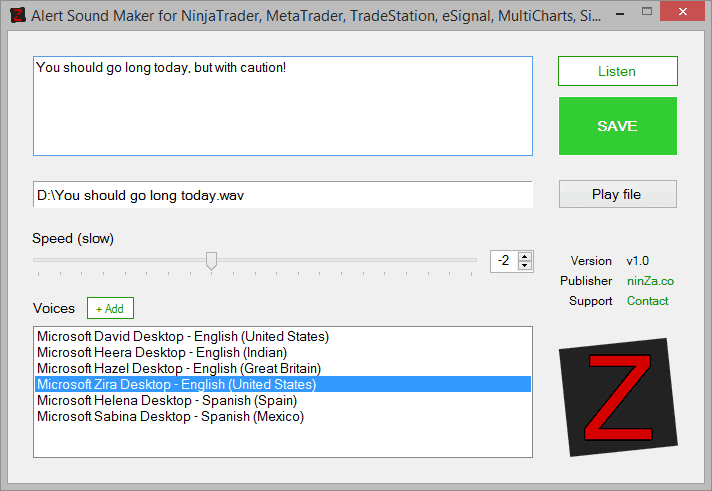
Alert Sound Maker is a stand-alone desktop application and one of the best day trading tools for traders who rely on clear, spoken alerts. It runs on Windows 7, 8, and 10. The software creates sound files based on your input texts, in .WAV format. These .WAV files can be used as alert sounds in 99% of desktop trading platforms, including but not limited to: NinjaTrader, MetaTrader, TradeStation, eSignal, MultiCharts, Sierra Chart, Investor/RT, CQG...
In Windows 8 or Windows 10, you can easily add new languages & voices. Almost all popular languages are supported: English, Chinese, Spanish, Russian, French, Italian, German, Japanese, Arabic⌠This allows alerts to be spoken in your native language, which is especially useful when working with fast markets and the best day trading tools. Please read our guide for details.
Have you got confused or fed up with the built-in "Alert3.wav" and "Alert4.wav"? Alert sounds should be information-rich and custom made for each indicator, each instrument, each timeframe. In other words, you need alert sounds that actually talk to you about specific scenarios. This is crucial and therefore demanded by all serious traders. Alert Sound Maker solves the problem! The software creates sound files (.WAV) based on your input texts. Then you just need to copy these .WAV files to the sound folder of NinjaTrader and start using them as alert sounds in the platform:
- NinjaTrader 8, 32-bit Windows â C:\Program Files\NinjaTrader 8\sounds
- NinjaTrader 8, 64-bit Windows â C:\Program Files (x86)\NinjaTrader 8\sounds
- NinjaTrader 7, 32-bit Windows â C:\Program Files\NinjaTrader 7\sounds
- NinjaTrader 7, 64-bit Windows â C:\Program Files (x86)\NinjaTrader 7\sounds
Aside from this best day trading tool, explore other NinjaTrader 8 indicators, tools, and systems that can further enhance your trading strategy.

Key Features
- Create .WAV file based on input text
- Suggest filename smartly based on input text (like Microsoft Word)
- Preview sound in real time
- Play audio file again after saving
- Allow controlling speed: slow, normal, fast (from -10 through 10)
- Allow choosing voices
- Allow adding new languages & voices Windows 8 or 10
Policies
Software license
Every purchase includes a perpetual software license, granting you the right to use the software indefinitely on the number of computers permitted by your license.
Installation & Onboarding
Every purchase includes guided installation assistance.
Purchases with Premium Services also include white-glove software setup and onboarding, along with personalized trading setup and workflow optimization.
Software updates & upgrades
Software updates & upgrades are provided at no additional cost.Â
For products with a modular structure, this coverage applies to the core product, while optional expansion modules may be offered separately.
Read the full policy
Customer service
Every purchase includes lifetime support via email & chat, delivered by our renowned Customer Care team â widely recognized throughout the trading community for its world-class service.
As your NINZA product collection expands, Premium Path unlocks a growing range of enhanced Customer Care benefits & privileges, available through dedicated channels.
Explore Premium Path
Remote assistance
Every purchase includes up to 3 complimentary remote assistance sessions, available within 30 days of purchase â with each session lasting up to 30 minutes.
Purchases with Premium Services include up to 6 sessions within 60 days of purchase, with priority scheduling and longer session durations.
Product exchange
Customers may request up to 3 product exchanges within 30 days of purchase, at little or no additional cost when exchanging for a comparable product.
Read the full policy
Returns & refunds
Due to the ease with which software products can be stored and copied, no returns will be accepted and no refunds will be issued.
ALL SALES ARE FINAL & NON-REFUNDABLE.