Smart Escape turns your exit plan into a structured, repeatable process — helping you react faster, protect open profits, and reduce emotional decision-making when the market turns.
Exit trades faster with Alt + click emergency exits or custom bullish/bearish bar-sequence rules that close positions automatically before reversals deepen.
One-time investment
Early Black November pricing is now available.
Use coupon ZACCESS for an extra 5% in savings on eligible products. Explore Early Access
Need guidance? Contact sales
Perpetual license
Lifetime support
Free updates
30-day exchange
Part of a broad trading intelligence ecosystem comprising 300+ research projects and products.
Trusted by
60,000+ traders
worldwide
Reflected in
700+ verified
5-star reviews
Backed by
12 years of
research & innovation
Automatic exit management for NinjaTrader 8
Smart Escape is designed for traders who need to exit fast without losing accuracy.
Whether you’re scalping quick moves or managing swing trades, it gives you a logical and reliable way to handle exits under pressure.
Why exits matter more than we think
Every second counts in trading. You may have a solid entry, but if your exit is late or uncertain, profits can slip away or losses can build.
Smart Escape provides structure for those critical exit moments:
You enter a good trade, but forget to set your stop or target.
You look away for a moment, and price reverses sharply.
You hesitate at the exit, hoping for a little more, and watch profits slip away.
You want to exit after a sequence of bullish or bearish bars before a reversal hits.
Smart Escape gives you a structured exit process that is logical, and repeatable, even when markets move faster than you can react.
How Smart Escape works
1. One-click emergency exit
With a simple mouse click while holding the Alt key, Smart Escape instantly applies your predefined exit plan to the open position.
It’s fast, straightforward, and keeps risk under control right from the start.
2. Flexible exit strategy for reward–risk balance
Beyond standard ATM exits, Smart Escape can manage exits that aim for higher reward and lower risk, adapting to actual market movement.
For example:
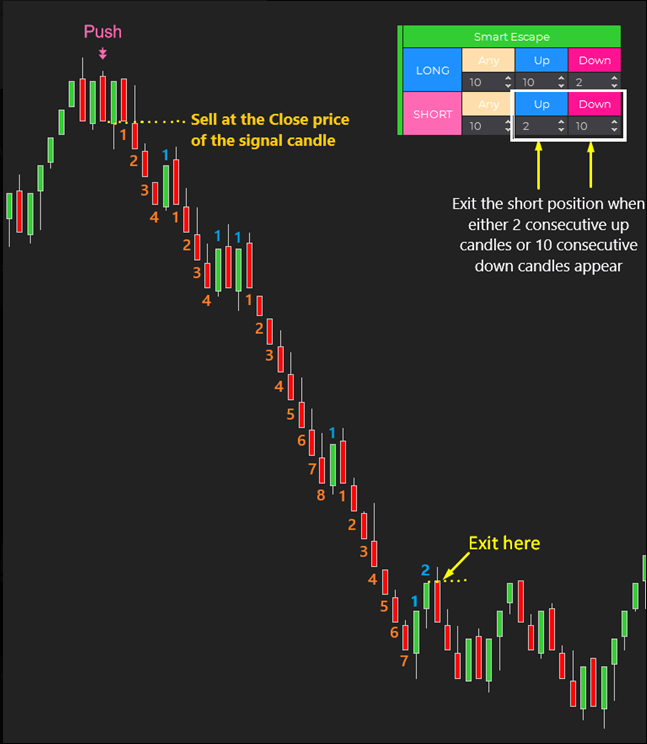
You enter a short at the close of a signal bar, then set exit conditions:
Exit for maximum reward → after 10 consecutive bearish bars
Exit for risk control → after 2 consecutive bullish bars
The tool closes the trade on whichever condition happens first.
In this case, the 2 bullish bars appear first, so the position exits there. You still capture a solid run while avoiding a deeper reversal.
3. Removing emotions from exits
One of the hardest parts of trading is knowing when to let a trade run and when to step out. Smart Escape helps you:
Avoid overtrading by sticking to defined rules
Protect profits without constantly monitoring the chart
Build consistency by using the same structured logic on every trade
4. Works alone or with other tools
Smart Escape can stand on its own, or it can become part of a complete strategy when paired with other tools:
Captain Optimus Strong + Smart Escape → Build a fully automated workflow. Captain Optimus Strong handles the auto entries based on your signal logic, while Smart Escape manages the auto exits based on bar color sequences. Together, they create a complete entry–exit cycle without manual intervention.
ATR-TradeShield + Smart Escape → Combine 2 layers of trade management. ATR-TradeShield provides a dynamic trailing stop that follows market volatility, while Smart Escape adds a rule-based auto exit using bar colors. This gives you both adaptive protection and structured logic in the same position.
With these combinations, Smart Escape doesn’t just manage exits – it becomes a flexible piece in building your own semi-auto or fully automated trading system.
Product Media
Watch the indicator in action. Step-by-step guides, live trading, and feature overviews.
Software Changelog
20 Aug 2025:The “Active ‘Til Canceled” & “Account Selector” features were added; the graphical user interface was updated.
15 Aug 2025:The indicator was released (built new).
Policies
Software license
Every purchase includes a perpetual software license, granting you the right to use the software indefinitely on the number of computers permitted by your license.
Installation & Onboarding
Every purchase includes guided installation assistance. Purchases with Premium Services also include white-glove software setup and onboarding, along with personalized trading setup and workflow optimization.
Software updates & upgrades
Software updates & upgrades are provided at no additional cost. For products with a modular structure, this coverage applies to the core product, while optional expansion modules may be offered separately. Read the full policy
Customer service
Every purchase includes lifetime support via email & chat, delivered by our renowned Customer Care team – widely recognized throughout the trading community for its world-class service. As your NINZA product collection expands, Premium Path unlocks a growing range of enhanced Customer Care benefits & privileges, available through dedicated channels. Explore Premium Path
Remote assistance
Every purchase includes up to 3 complimentary remote assistance sessions, available within 30 days of purchase – with each session lasting up to 30 minutes. Purchases with Premium Services include up to 6 sessions within 60 days of purchase, with priority scheduling and longer session durations.
Product exchange
Customers may request up to 3 product exchanges within 30 days of purchase, at little or no additional cost when exchanging for a comparable product. Read the full policy
Returns & refunds
Due to the ease with which software products can be stored and copied, no returns will be accepted and no refunds will be issued. ALL SALES ARE FINAL & NON-REFUNDABLE.
Community perspectives
From individual traders to pros and institutional trading teams... Trusted worldwide! Read traders' thoughts
4.9
Based on 800+ authentic reviews
Christopher Heathman
Grace was AWESOME! taking care of me
I'm totally impressed with the following about ninZa.co service from all of the girls, but Grace is my favorite. Product knowledge and support. Great pricing. Always there to offer advice and get everything setup. Looking forward to using the new software. I'll comeback and write a review.
Samuel Grossman
ninZa.co has excellent customer Service
ninZa.co has excellent customer service. They are very helpful and go above and beyond. In my 30+ years of dealing with all kinds of companies, Ninza.co has the best customer service I have ever experienced.
I have been dealing with them for maybe 3 years or so now and I am continually impressed. I usually deal with Grace or Cute Flora. Both are fantastic. In my recent purchase Cute Flora went above and beyond for what she did for me, and it was greatly appreciated.
Samuel
Abhijit Banerjee
An Amazing Organization With Amazing People & Products
I have been with ninZa.co for many years now and over the years my trading method and objectives have changed and I have always found a product to make my trading better. The Customer Service from Hannah, Jennifer and the entire team is way beyond describing in words. They are constantly researching on ways to improve their indicators and how best to combine them for efficient and improved results. If you are clear in what kind of trading you do, then they will have something that will make your trading better.
Ben
Exceptional Responsiveness and Professional Communication: Prompt and thorough replies to my inquiries, demonstrating professionalism
ninZa.co is very responsive to my many questions and comments. I’ve sent their support folks numerous questions and have always received a reply within 24 hours. If it weren’t for the 11-hour time zone difference, I have no doubt they would respond even more quickly. They have always been very professional in their communication with me. Thanks, ninZa.co.
Steffie
Thank you for providing free indicators
The customer service is very helpful and it's great that I can have these indicators for free.
Lance S.
High-Quality Indicators and Outstanding Customer Service at ninZa.co
I have been purchasing and using indicators from ninZa.co since Larry Pi started his business with a website of about 10 indicators many years ago. And I have continued to purchase and use his indicators with additional purchases over the years. There are tons of trading vendors out there. Many I have tried and abandoned because they didn’t work and there was no customer service that I could easily email and get a prompt response for help.
What makes ninZa.co so special is not just the high quality of the indicators, but the outstanding customer service and help. I have been working with Grace over the last 6 months, and she has provided prompt, cheerful, and most importantly, high-quality customer service. Larry is lucky to have her on his team! GO GRACE!!
Jim
Excellent Support From Grace: Problem Solved!
I would say that you did a great job with the support you provided, Grace. Very eager to help and you solved my problems. Thank you again for your help.
Agbaje
Multi-Osc OB/OS Overlap, Solar Wind Plus KingRenko$ Bar With Outstanding Support From Miss Grace Lopez
I was struggling to set up my newly bought product in the name of Multi-Osc OB/OS Overlap, Solar Wind plus KingRenko$ bar I just bought it. As soon as I started the chart box, Miss Grace Lopez came to my rescue. She lead the way, connected to my computer with my permission, and set up my software without any problems. She was patient and kind. I am so grateful to her and truly appreciate her assistance. She is certainly an asset to your company. Hopefully, she will stick around longer and ninZa.co group of companies i.e. personnel will appreciate her contribution to the company. Once again, Thank you Miss Grace for your effort in solving my frustration at 2:00 Am in the morning.
Sigma Bob
Highly Recommended Service - Ms. Hannah
ninZa.co Hannah has provided timely service on information and purchases. Foreign support is generally complained about, but ninZa.co Hannah has been attentive and responsive to my email communications. For that I thank her and she reflects positively on ninZa.co.
Research Domains
Full spectrum of trading intelligence across diverse domains. Explore all domains
Statistics & Quant
Turn market data into measurable insight
Use data, statistics, and quantitative models to measure market behavior and identify meaningful patterns. Turn these insights into data-driven signals, probabilities, and trading decisions.
Support & Resistance
Find where price may turn or break
Identify key price areas where buying and selling pressure tend to react. Help traders recognize important levels for potential reversals, trend continuation, or breakouts, and plan trades around these key areas.





_1787026707358.svg)






