Spot reliable breakouts in sideways markets with auto-drawn Original and Follow-Up Darvas Boxes, strict fakeout filters, and layered support/resistance levels.
$250R2BOne-time investment
Zaccess extended through October Use coupon “ZACCESS” for up to 10% purchase assistance on this product’s R2B price. Learn more → https://ninza.co/zaccess
Earn $13 back in Zuture Wallet • Online orders only ✓
Need guidance? Contact sales
Perpetual license
Lifetime support
Free updates
30-day exchange
Earn $13 back in Zuture Wallet • Online orders only ✓
Part of a broad trading intelligence ecosystem comprising 300+ research projects and products.
Trusted by
60,000+ traders
worldwide
Reflected in
700+ verified
5-star reviews
Backed by
12 years of
research & innovation
Advanced Darvas Box indicator for NinjaTrader 8
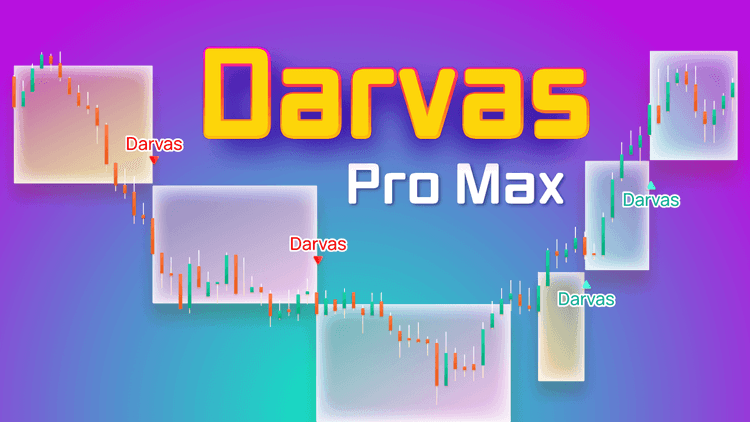
Darvas Pro Max, an enhanced Darvas Box indicator for NinjaTrader 8, is developed based on Nicolas Darvas' theories about support/resistance levels in a market period.
It helps you identify breakouts and reliable trading opportunities during low-volatility or sideways market phases, giving indispensable insight into market conditions. You'll feel more confident trading breakouts with Darvas Pro Max.
The indicator offers extra layers of support and resistance levels, ensuring you make informed and strategic trading decisions.
What is a Darvas Box?
A Darvas Box is a trading concept developed by Nicolas Darvas to identify price consolidation zones and potential breakout points. Each box represents a range of support and resistance levels, helping traders spot low-volatility phases and make informed breakout entries.
Darvas Pro Max automates the detection of these boxes, providing clear visual cues, breakout signals, and reliable support/resistance levels so you can confidently execute Darvas trading strategies.
How Darvas Pro Max applies Darvas Box rules
Darvas Pro Max includes an advanced algorithm designed to minimize fakeouts, ensuring that breakout signals are highly reliable and reducing inherent risk.
Step 1: Original Darvas box formation
The Darvas Box indicator for NinjaTrader 8 first identifies an Original box, a unique feature designed to detect low-volatility market phases using strict rules.
You should pay close attention when an Original box forms, as the trading signals that follow are highly reliable for spotting breakouts and support/resistance levels.
The Original box is color-coded in yellow, making it easy for you to identify on the chart. It is determined based on the flat condition of the baseline combined with your customized cycle range, providing a clear visual representation of low-volatility areas and helping you plan high-probability breakout entries.
Step 2: Breakout signal generation
A breakout signal occurs when the price exits the Original Darvas box (yellow) and satisfies at least one of the following conditions:
Broken (%): The price moves beyond the box’s edge by a percentage greater than the predefined threshold, triggering a breakout trading signal at the current price.
Broken (Bars): The price moves outside the box’s edge by a set number of candles, generating a breakout signal at the current price.
(You can adjust the percentage and number of candles in the product’s settings.)
These signals allow traders to identify reliable high-probability breakout entries with the Darvas Box indicator for NinjaTrader 8.
Step 3: Follow-Up Darvas Boxes
After the Original box, Follow-Up Darvas Boxes are formed to track subsequent market moves:
An Upward Follow-Up Darvas box (blue) is created after an upside breakout signal.
A Downward Follow-Up Darvas box (pink) is created after a downside breakout signal.
These Follow-Up Darvas Boxes maintain the same range as the Original Darvas box immediately preceding them, ensuring consistency in support/resistance levels and breakout analysis.
A Follow-Up box ends when one of the following occurs:
A new breakout signal is generated within the current box (using the same mechanism as in the Original Darvas box).
A new Original Darvas box is formed.
How Darvas Pro Max supports Darvas trading
Trading in sideways or low-volatility markets can be challenging, but the Darvas Box indicator for NinjaTrader 8 helps you execute Darvas trading more effectively and confidently.
Identify Low-volatility zones and Breakouts: The indicator automatically detects low-volatility phases and marks them with Original Darvas boxes (yellow), providing a clear visual representation of potential breakout areas. This allows you to identify high-probability entry points without guessing where the market may move next.
Spot reliable Support and Resistance levels: Each Original and Follow-Up Darvas box generates support and resistance levels from the top and bottom edges of the boxes. These levels let you assess price behaviors and make more informed trading decisions, improving the overall success of the Darvas trading strategy.
Automate Darvas box drawing: Manual drawing of Darvas boxes can be time-consuming and inefficient. Darvas Pro Max automates the creation of Original and Follow-Up Darvas boxes and generates breakout signals based on strict rules, helping traders spot reliable entries and avoid false breakouts.
Visual improvements for clearer charts: The indicator is designed for aesthetic clarity. You can toggle the indicator on or off within NinjaTrader 8 easily, making it convenient to manage multiple indicators on your chart while maintaining a clean, readable workspace.
The Darvas Box indicator for NinjaTrader 8 combines automated low-volatility detection, breakout signals, and clearly defined support/resistance levels, helping you make confident and informed decisions while following Darvas trading strategies, even when markets move sideways.
Signal_Trade: 1 = bullish, -1 = bearish, 0 = no signal
Product Media
Watch the indicator in action. Step-by-step guides, live trading, and feature overviews.
Software Changelog
29 Jul 2024:An error while building the BloodHound template was fixed.
12 Jun 2024:The memory write protect error was fixed.
02 Apr 2024:“Gradient Enabled” was added.
Policies
Software license
Every purchase includes a perpetual software license, granting you the right to use the software indefinitely on the number of computers permitted by your license.
Installation & Onboarding
Every purchase includes guided installation assistance. Purchases with Premium Services also include white-glove software setup and onboarding, along with personalized trading setup and workflow optimization.
Software updates & upgrades
Software updates & upgrades are provided at no additional cost. For products with a modular structure, this coverage applies to the core product, while optional expansion modules may be offered separately. Read the full policy
Customer service
Every purchase includes lifetime support via email & chat, delivered by our renowned Customer Care team – widely recognized throughout the trading community for its world-class service. As your NINZA product collection expands, Premium Path unlocks a growing range of enhanced Customer Care benefits & privileges, available through dedicated channels. Explore Premium Path
Remote assistance
Every purchase includes up to 3 complimentary remote assistance sessions, available within 30 days of purchase – with each session lasting up to 30 minutes. Purchases with Premium Services include up to 6 sessions within 60 days of purchase, with priority scheduling and longer session durations.
Product exchange
Customers may request up to 3 product exchanges within 30 days of purchase, at little or no additional cost when exchanging for a comparable product. Read the full policy
Returns & refunds
Due to the ease with which software products can be stored and copied, no returns will be accepted and no refunds will be issued. ALL SALES ARE FINAL & NON-REFUNDABLE.
Community Perspectives
From individual traders to pros and institutional trading teams... Trusted worldwide! Read traders' thoughts
4.9
Based on 800+ authentic reviews
M.
Indicators Improved My Charts. Hannah's Help And Great Customer Service. Will Buy Again.
I have been using the ninZa.co indicators for several months now and am very happy with what a valuable addition they have been to my charts. I recently decided to add one of the recently released indicators from ninZa.co. But after using for a few days, it wasn’t quite what I had been looking for. I contacted ninZa.co and had the pleasure of working with Hannah for an exchange to a different one of the many available indicators. At the time, the indicator I wanted to purchase to replace the one I had recently bought was on sale. Hannah put through an exchange and without my having to ask, gave me the advantage of the sale price. She also included a pdf that provided education about the indicator I chose to switch to. Any time I have had contact with one of the associates from ninZa.co, I have received excellent customer service, and will not hesitate to purchase from them again.
Bartosz
Grace Goes Above And Beyond: A Customer Support Experience That Exceeds Expectations!
Thank You, Grace! Your support is extraordinary I wish all companies have such great support. Keep going I’m 200% satisfied.
Kari L.
ConnorsRSI Pro With Grace's Outstanding Customer Service
Thank you very much for your excellent customer service, Grace! You are doing an excellent job making customers' lives much easier.
T.
An Exemplary Customer Experience At NinZa.Co: Unveiling The Power Of Cumulative Delta
I'm a new customer with ninZa.co and i was needing help today in making a purchase. I made a request on your chat platform and Hannah came to my rescue. She helped me find the what I needed and even offered me a discount. Everything went very smoothly from that point. I made the purchase and she even provided me some documentation on the indicator. I am very pleased with her assistance. Thanks again Hannah for your excellent customer service !!
Mike W.
Smart Ruler
I use ninZa.co's Smart Ruler every day !!! It is on all charts and helps me a great deal. Smart Ruler is one great tool for NinjaTrader !!!!!!!
A. B.
The indicator is working perfectly
The indicator is working perfectly. You guys are the best - Purchased Smart Zoom + Supply/Demand Discovery
Sandeep Rao
Awesome Indicator And Pi Rocks
This is my story, I ordered the Day Range indicator for NIFTY India. To my dismay, it didn't work well as it calculated ranges in ticks. I asked Larry Pi if there was a workaround, and he created a new version with all the choices for range unit: points, ticks, pips. He was with me all through the process, with very short turnaround cycles. So don't hesitate at all to pick what you want! You won't regret.
J.
Grateful For Excellent Support From Hannah!
Hi Hannah, Thank you for your great support. You got back to me right away, provided links to solve the problem, and they worked great! All is well that ends well, and your kind and more than adequate support ended very well! Thanks.
David P. From Connecticut
- Purchased Supply/Demand Discovery + TDI Pro + Solar Wind + Intraday Adaptive S/R + Ruby River + Market Profile (Daily) + Day Range
Just got your new Supply/Demand Discovery and it is truly a great improvement over everything else on the market. It will take me days to determine the best values for the variables for my different charts, but it will be worth the effort.
Research Domains
Full spectrum of trading intelligence across diverse domains. Explore all domains
Price Action
Decode the behavior behind price moves
Analyze price behavior and structure through price movements. Identify trends, momentum, key reaction areas, and meaningful shifts in market behavior to better assess price direction.
Analyze buying and selling pressure to identify where supply or demand dominates. Assess potential price reactions and help traders identify higher-probability trading opportunities.




_1787026707358.svg)