M.
Not sure which category you need? The overview of NinjaTrader addons breaks them down by trading style.
With momentum trading, a trader needs to locate an entry opportunity in a short-term trend and exit when the trend is likely to lose its momentum. After taking the profit, the trader seeks the next short-term trend to repeat the process. This is a trading strategy that requires strict discipline for entries & exits (as well as money management).
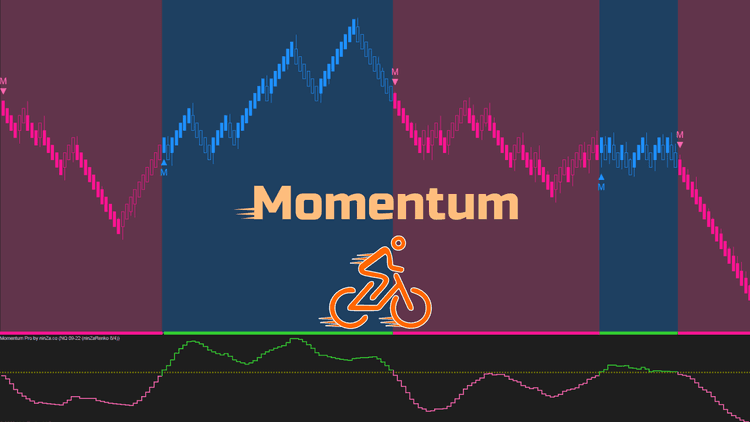
Our Momentum Pro indicator supports momentum traders by recognizing potential trend starts & ends based on momentum analysis. We added an upper bound and a lower bound above & below the momentum plot to help identify meaningful changes in momentum, and therefore potential trends. Here is the logic, very simple:
- When the lower bound crosses above zero, an uptrend starts. The uptrend will remain until the momentum plot falls below zero.
- When the upper bound crosses below zero, a downtrend starts. The downtrend will remain until the momentum plot rises above zero.
Dedicated NinjaScript Signals
- Signal_Trend: 1 = uptrend, -1 = downtrend, 0 = neutral
Key Features
- Plot momentum, upper bounder, lower bound
- Allow smoothing momentum (with 11 popular moving averages)
- Allow choosing the offset type: StdDev, ninZaATR, Tick
- Allow configuring the offset multiplier to decide how far the bounds are from momentum plot
- Paint bars to show 3 phases: uptrend, downtrend, neutral
- Paint background to show 3 phases: uptrend, downtrend, neutral
- Colorize momentum plot to show 3 phases: uptrend, downtrend, neutral
- Print markers on trend start
- Trigger alerts on trend start
- Be NinjaScript ready for advanced usage, only restricted by your imagination
- Expose dedicated NinjaScript signals
Software Changelog
- 12 Jun 2022:- The indicator was released (build new).
Policies
Software license
Every purchase includes a perpetual software license, granting you the right to use the software indefinitely on the number of computers permitted by your license.
Installation & Onboarding
Every purchase includes guided installation assistance.
Purchases with Premium Services also include white-glove software setup and onboarding, along with personalized trading setup and workflow optimization.
Software updates & upgrades
Software updates & upgrades are provided at no additional cost.Â
For products with a modular structure, this coverage applies to the core product, while optional expansion modules may be offered separately.
Read the full policy
Customer service
Every purchase includes lifetime support via email & chat, delivered by our renowned Customer Care team â widely recognized throughout the trading community for its world-class service.
As your NINZA product collection expands, Premium Path unlocks a growing range of enhanced Customer Care benefits & privileges, available through dedicated channels.
Explore Premium Path
Remote assistance
Every purchase includes up to 3 complimentary remote assistance sessions, available within 30 days of purchase â with each session lasting up to 30 minutes.
Purchases with Premium Services include up to 6 sessions within 60 days of purchase, with priority scheduling and longer session durations.
Product exchange
Customers may request up to 3 product exchanges within 30 days of purchase, at little or no additional cost when exchanging for a comparable product.
Read the full policy
Returns & refunds
Due to the ease with which software products can be stored and copied, no returns will be accepted and no refunds will be issued.
ALL SALES ARE FINAL & NON-REFUNDABLE.