M.
Overview
We added massive improvements in the NT8 version, which makes it a super order execution tool for NinjaTrader 8. However, please be informed that the NT7 version is not at the same level of functionality. Please read below to know which features are unavailable in the NT7 version.Â
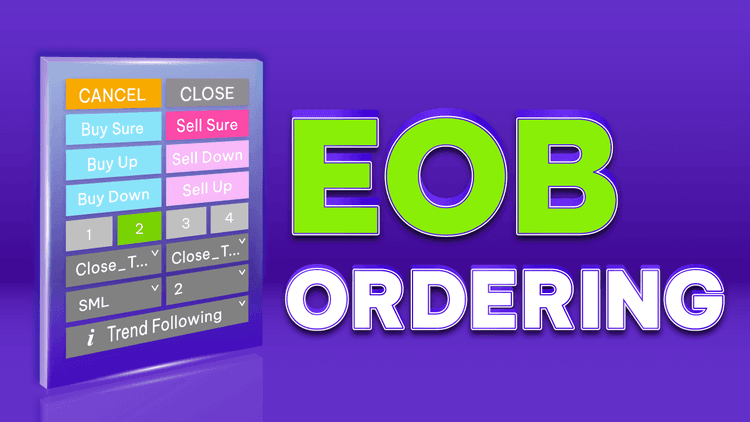
"EOB" denotes End Of Bar; this is an amazing NinjaTrader ordering tool that you'll see nowhere else. This amazing addon works with ANY bar types.
Many traders only place orders at the end of a bar because this style relieves harmful emotions and gives more solid confirmations of trading signals. However, we are just slow humans so it is inevitable to be late by several seconds (sometimes even tens of seconds), during which a superfast market may have moved dozens of ticks.
Don't worry! Let EOB Ordering play the tough game for you, as this NinjaTrader tool was designed to reduce the ordering time to just a few... milliseconds (1 millisecond = 1/1000 second).
And now, let's introduce the SUPERPOWER of EOB Ordering. Suppose the market (ninZaRenko chart) is trending up with a series of green bars, and you would like to automatically enter short just after the first red bar appears (trend reversal). This is NOT an easy task for humans because the market moves so fast. Let EOB Ordering do the hard work for you! All you have to do is to enable "Active 'Til Canceled" in the settings, then click the "Sell Down" button, and then... relax or do anything you want. From that on, our super NinjaTrader tool will monitor bar bias from bar to bar and automatically place a SELL order on the first red bar's close. To reversal or pullback traders, this is a super feature that is worth $1000+, $3000+, or even $5000+ !!!
Thousands of traders are already using our best-selling NinjaTrader 8 indicators to spot high-probability setups faster than ever â click to discover what they know that you don't.
FAQs
1. What is the best trend indicator for NinjaTrader?
There is no best trend indicator for all traders. You can choose one is the best for you and suits your needs. Top NinjaTrader trend indicators are Solar Wave, Solar Wave RK, or Easy Trend.
2. What chart do most traders use?
Bar data charts are frequently utilized in trading and technical analysis. They consolidate information over specific periods, which may not always be time-based.
3. What is the best time frame for day trading?
Day traders generally focus on the 1-hour time frame or lower, so starting with the 15-minute or 30-minute charts can be beneficial.

Key Features
- Place EOB market orders
- Place EOB pending orders: LMT, MIT, STP, SLM (with predefined SLM offsets) NT8 only
- Allow choosing reference price type for pending orders: next bar's first tick or focused bar's close, open, high, low, median, typical, weighted NT8 only
- Allow choosing reference price offset (in ticks or pips) for pending orders NT8 only
- Support 4 presets for quantity NT8 only
- Allow defining bar bias (up/down) based on bar body (i.e. the difference between bar close & bar open)
- Allow defining bar bias (up/down) based on neutral range (please read this for an easy explanation of neutral range) NT8 only
- Allow defining bar bias (up/down) based on whether the focused bar closes outside the previous bar's range NT8 only
- Display real-time status of an EOB order
- Allow keeping EOB order active through bars with Active 'Til Canceled option
- Provide easy management via a draggable & customizable control panel NT8 only
Software Changelog
- 14 Nov 2021:The "Price Action" mode (to judge the bar bias) was added.
- 01 Sep 2020:Massive changes, fixes and improvements were made (DPI, display name, Z order); negative offset was permitted.
- 22 Mar 2019:The licensing system was critically upgraded.
Policies
Software license
Every purchase includes a perpetual software license, granting you the right to use the software indefinitely on the number of computers permitted by your license.
Installation & Onboarding
Every purchase includes guided installation assistance.
Purchases with Premium Services also include white-glove software setup and onboarding, along with personalized trading setup and workflow optimization.
Software updates & upgrades
Software updates & upgrades are provided at no additional cost.Â
For products with a modular structure, this coverage applies to the core product, while optional expansion modules may be offered separately.
Read the full policy
Customer service
Every purchase includes lifetime support via email & chat, delivered by our renowned Customer Care team â widely recognized throughout the trading community for its world-class service.
As your NINZA product collection expands, Premium Path unlocks a growing range of enhanced Customer Care benefits & privileges, available through dedicated channels.
Explore Premium Path
Remote assistance
Every purchase includes up to 3 complimentary remote assistance sessions, available within 30 days of purchase â with each session lasting up to 30 minutes.
Purchases with Premium Services include up to 6 sessions within 60 days of purchase, with priority scheduling and longer session durations.
Product exchange
Customers may request up to 3 product exchanges within 30 days of purchase, at little or no additional cost when exchanging for a comparable product.
Read the full policy
Returns & refunds
Due to the ease with which software products can be stored and copied, no returns will be accepted and no refunds will be issued.
ALL SALES ARE FINAL & NON-REFUNDABLE.