[03 Jun] BigTrade Sweep: Detecting Big Trades in every candle - Discover indicator
[8 May] New Horizon: A new standard in intraday automated trading ☀️ - Discover our Super Autosystem
[27 Apr] DeepStack Confluence: Multi-Timeframe & Multi-Indicator confluence in 1 chart - Discover indicator
[22 Apr] Entropy Voltex: Trade only when market conditions support your setup - Discover indicator
[14 Apr] Imbalance Insight Matrix: Detect trading zones that attract the most attention - Discover indicator
[08 Apr] Gravity OrbitX: Where high-probability reversals actually form - Discover indicator
Product Description
Overview
Which indicator is used by both pros & beginners? It must absolutely be a moving average.
However, many traders just forget or ignore the importance of a moving average. They try to place buy/sell orders all the times without judging whether they conform with trend phases. A stupid-simple rule will improve or save your trading career: take only long signals when the trend is up, and take only short signals when the trend is down.
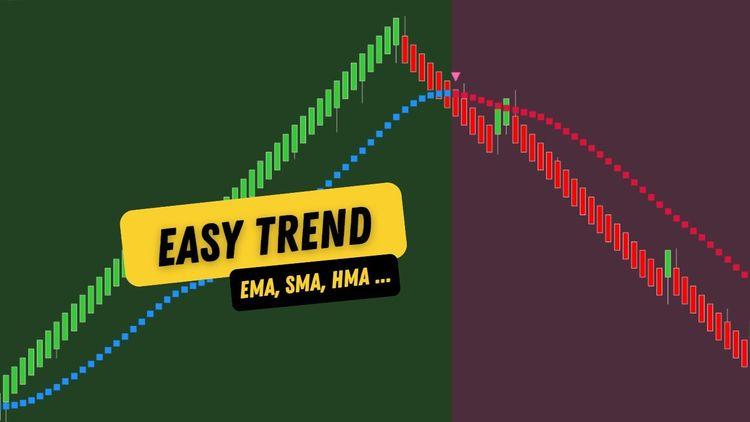
How can this discipline be kept consistent throughout your trading activities? The problem is solved with the assistance of an indicator that paints the plot color and/or chart background to visually tell whether the trend is up or down. ninZa.co's Easy Trend actually makes trend interpretation easy on the eyes.
It comes with 11 moving average types to select, along with 11 moving average methods for smoothing. That's totally 11 x 11 = 121 combinations (and still not taking into account the adjustment of periods). You will have a whole lot of flexibility to define and fine-tune your favorite moving average.
We also added a filter to let traders specify the minimum plot change that is required to make the moving average angles up/down. If the plot change is less than the filter amount (in ninZaATR or tick unit), the moving average will turn flat. This filter can be applied before or after smoothing, at your discretion.
In this NinjaTrader trend indicator, ninZaATR is used (instead of regular ATR) for better performance. For your information, ninZaATR is ninZa.co's special ATR version that helps improve indicator performance significantly on intraday charts. It is also a standalone FREE indicator for ninZaFamily → https://ninza.co/product/ninzaatr.
Key features:
Easy Trend, a NinjaTrader trend indicator, gives you many key features as below:
- Allow defining moving average with (11 popular moving averages)
- Allow smoothing moving average
- Allow applying a plot change filter, either before or after smoothing
- Paint plot to clearly show uptrend vs downtrend
- Paint chart background to clearly show uptrend vs downtrend
- Trigger alerts on trend shift
- Print markers on trend shift
- Be NinjaScript ready for advanced usage, only restricted by your imagination
- Expose dedicated NinjaScript signals
Browse our NinjaTrader 8 indicator collection — a carefully curated set of tools designed to fit a wide range of trading styles and strategies.
FAQs
1.What is the best trend indicator for NinjaTrader?
Honestly, there is no best NinjaTrader trend indicator. You can only choose the one that is most suitable for your demand, your trading strategy, or your budget. Easy Trend or other trend indicators that you can refer to.
2. What is the ATR trend indicator in NinjaTrader?
The ATR (Average True Range) Trend indicator utilizes a trailing ATR to identify trend changes and define the trend. In NinjaTrader, the ATR indicator is mainly used to measure market volatility, rather than specifically identifying trends.

Dedicated NinjaScript Signals
- Signal_Trend: 1 = uptrend, -1 = downtrend
- Signal_Trade: 2 = uptrend Pullback, -2 = downtrend Pullback, 1 = uptrend start, -1 = downtrend start, 0 = no signal
Product Media
These media materials may have been recorded/captured in favorable markets. Please review our “acceptable marketing practices”.
Videos


Images
From Happy Customers
by M.
Indicators Improved My Charts. Hannah's Help And Great Customer Service. Will Buy Again.
I have been using the ninZa.co indicators for several months now and am very happy with what a valuable addition they have been to my charts. I recently decided to add one of the recently released indicators from ninZa.co. But after using for a few days, it wasn’t quite what I had been looking for. I contacted ninZa.co and had the pleasure of working with Hannah for an exchange to a different one of the many available indicators. At the time, the indicator I wanted to purchase to replace the one I had recently bought was on sale. Hannah put through an exchange and without my having to ask, gave me the advantage of the sale price. She also included a pdf that provided education about the indicator I chose to switch to. Any time I have had contact with one of the associates from ninZa.co, I have received excellent customer service, and will not hesitate to purchase from them again.
by Bartosz
Grace Goes Above And Beyond: A Customer Support Experience That Exceeds Expectations!
Thank You, Grace! Your support is extraordinary I wish all companies have such great support. Keep going I’m 200% satisfied.
by Kari L.
ConnorsRSI Pro With Grace's Outstanding Customer Service
Thank you very much for your excellent customer service, Grace! You are doing an excellent job making customers' lives much easier.
by T.
An Exemplary Customer Experience At NinZa.Co: Unveiling The Power Of Cumulative Delta
I'm a new customer with ninZa.co and i was needing help today in making a purchase. I made a request on your chat platform and Hannah came to my rescue. She helped me find the what I needed and even offered me a discount. Everything went very smoothly from that point. I made the purchase and she even provided me some documentation on the indicator. I am very pleased with her assistance. Thanks again Hannah for your excellent customer service !!
Which of these 10 trader types are you?
Discover your trader type and find the trading path that fits you best ↓
ninZa.co Indicators
0 online
10 layers of trade confirmation: Trend Following + Order Flow →
[Auto Trading] VWAP & Order Flow: 19 winning trades in 150 minutes
When order flow confirms your entries →
Software Changelog
10 Oct 2024
- A minor issue was fixed.
10 Sep 2024
- The Pullback signal was added; Signal_State was renamed to Signal_Trend; Signal_Trade was added.
11 Aug 2020
- Plot change filter was added; all plot values were rounded to the nearest tick size; regular ATR was replaced with ninZaATR for better performance; massive changes, fixes, and improvements were made
![June Exclusive: [AbsP] Summer Wave Bundle](https://forestcms.nyc3.digitaloceanspaces.com/media/small_Summer Wave bundle banner (1280x720)_1780571380106.jpg)
![[NEW] The one thing Smart Money can’t hide: Big trades](https://forestcms.nyc3.digitaloceanspaces.com/media/small_BigTrade Sweep banner_1780571714850.jpg)
![[Live Trading] Scalping Strategy using DeepStack Confluence](https://forestcms.nyc3.digitaloceanspaces.com/media/small_đeep-stack-hdhd_1780572796432.png)

![[AbsP] Daily Specials](https://forestcms.nyc3.digitaloceanspaces.com/media/small_Cosmik-z-tp-dsvvsdvsdvvdsv_1780762643089.png)