Confirm continuation setups with a 3-layer framework that combines trend bias, fast CCI confirmation, and slow CCI triggers in a momentum suite.
One-time investment
Zaccess extended through October Use coupon “ZACCESS” for up to 10% purchase assistance on this product’s R2B price. Learn more → https://ninza.co/zaccess
Earn $0 back in Zuture Wallet • Online orders only ✓
Part of a broad trading intelligence ecosystem comprising 300+ research projects and products.
Trusted by
60,000+ traders
worldwide
Reflected in
700+ verified
5-star reviews
Backed by
12 years of
research & innovation
2 Momentum speeds. One clear trade direction.
Momentum is rarely a singular event; it often builds in layers. A faster momentum reading usually establishes the immediate direction, while a slower momentum reading confirms the broader structural shift.
Double CCI Suite is built on this "layered momentum" philosophy. It eliminates the guesswork of standard crossovers by requiring alignment across 3 specific components:
Trend bias (Easy Trend): Defines the "lane" you should be trading in.
Momentum confirmation (CCI Trend Pro #1): Ensures the immediate momentum supports your trade direction.
Momentum trigger (CCI Trend Pro #2): Detects the entry point when the slower momentum component shifts into alignment.
A trade setup is only valid when all 3 elements converge. Together, they make a dual-momentum trading framework that integrates 2 CCI perspectives with a trend filter to identify cleaner, high-probability continuation opportunities.
The strategy: 3-layered confirmation
Layer 1: Directional bias (Easy Trend)
Before looking for entries, you must define the environment. Easy Trend acts as your objective filter.
The logic: Only take Long signals when the trend is bullish, and Short signals when the trend is bearish.
The value: By removing the noise of counter-trend trading, you significantly increase your win rate and reduce unnecessary losses. It provides 11 moving average types and 11 smoothing methods, offering 121 unique combinations to match your specific market style.
Layer 2 & 3: Momentum alignment (CCI Trend Pro)
The strategy utilizes 2 instances of CCI Trend Pro to gauge momentum strength and direction:
Instance #1 (Fast - Period 25): Acts as your confirmation layer, verifying that the current market pressure aligns with your trend bias.
Instance #2 (Slow - Period 50): Acts as your trigger layer. When this slower momentum component pivots, it signals that the market is beginning a new, sustainable move.
Setup & Execution
The following settings reflect the original Double CCI Suite framework. These can be adjusted based on your instrument's volatility.
Component
Setting
Role
Easy Trend
EMA 34
Trend filter
CCI Trend Pro #1
Period 25
Momentum confirmation
CCI Trend Pro #2
Period 50
Momentum Trigger
Chart Timeframe
1-minute or higher
Intraday application
These settings are provided as a baseline. We encourage traders to test and optimize parameters to suit their specific market and risk tolerance.
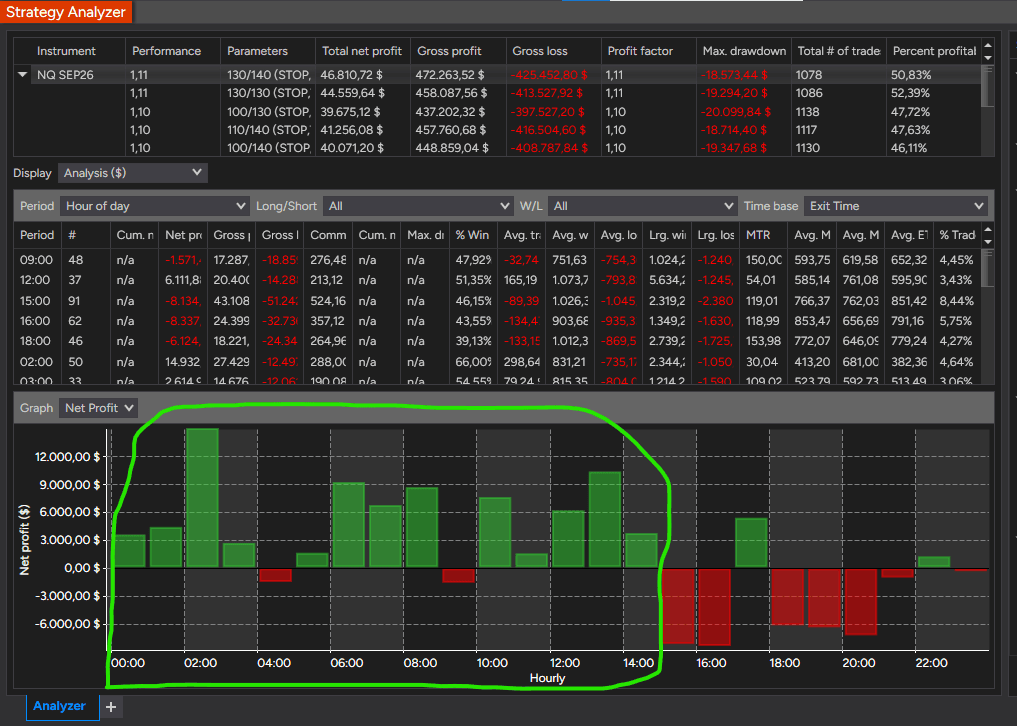
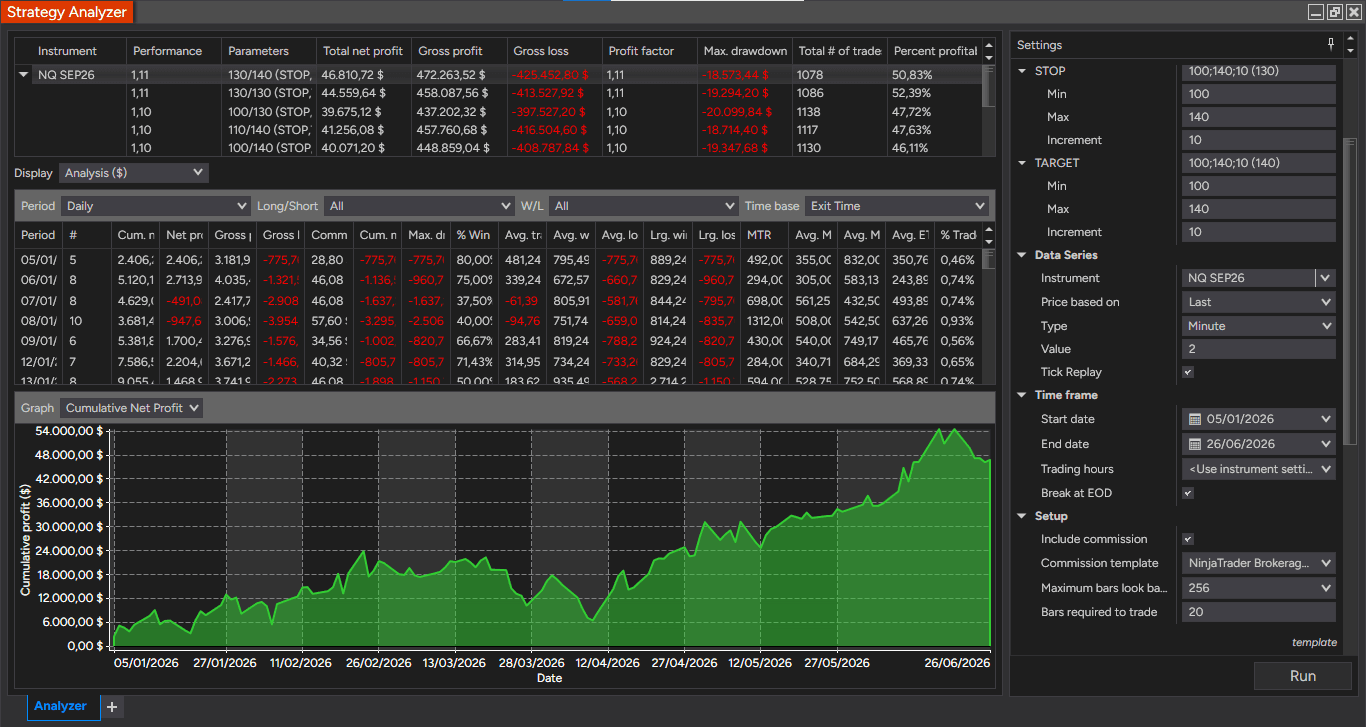
Antonino’s Strategy Analyzer comparison, optimization parameters, and selected backtest settings are shown in the Performance & Validation section below.
Why choose Double CCI Suite?
Double CCI Suite shifts the focus from simple signal hunting to a more structured analysis of momentum and market environment:
Deep momentum insight: Gain a clear view of true momentum behavior as it enters Overbought (OB) and Oversold (OS) zones, which is often obscured by single-indicator setups.
Filter false reversals: Confidently avoid the "weak" or "false" reversals often encountered within OB/OS zones when using a single CCI.
Clearer market context: Better visualize the relationship between momentum and the primary trend, ensuring you always trade in alignment with the broader market direction.
Eliminate entry dilemmas: Resolve the uncertainty of whether to play a reversal or a pullback; the system provides clear, objective signals specifically for high-probability pullback opportunities.
Automation & Workflow: Choose your path
The Double CCI Suite framework provides the logic, but how you execute that logic depends on your trading style. Consider and choose the path that matches your technical requirements:
1. Strategy Builder
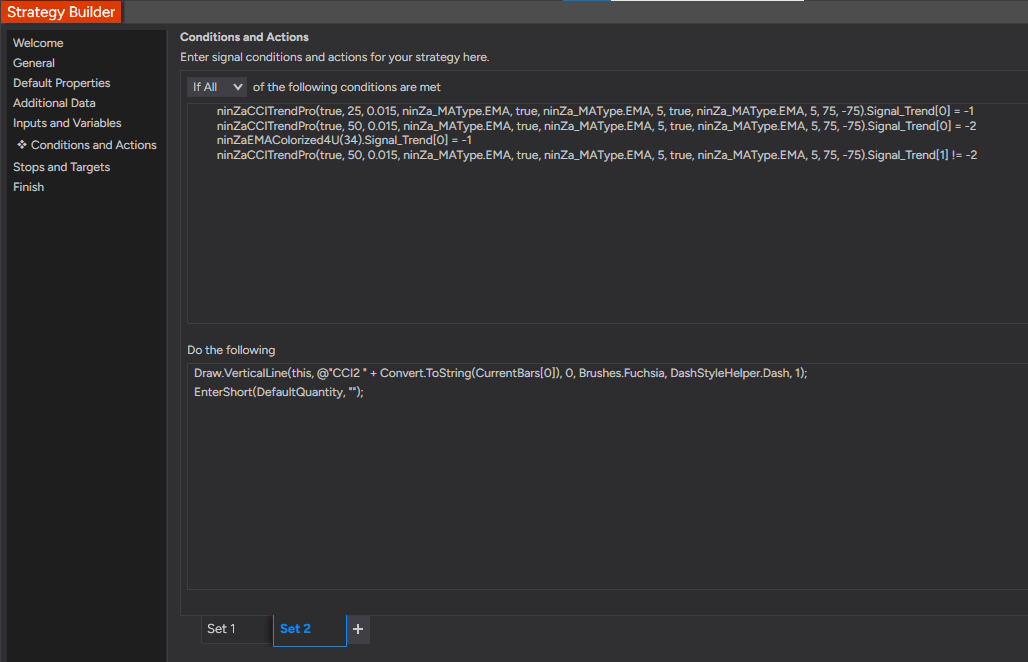
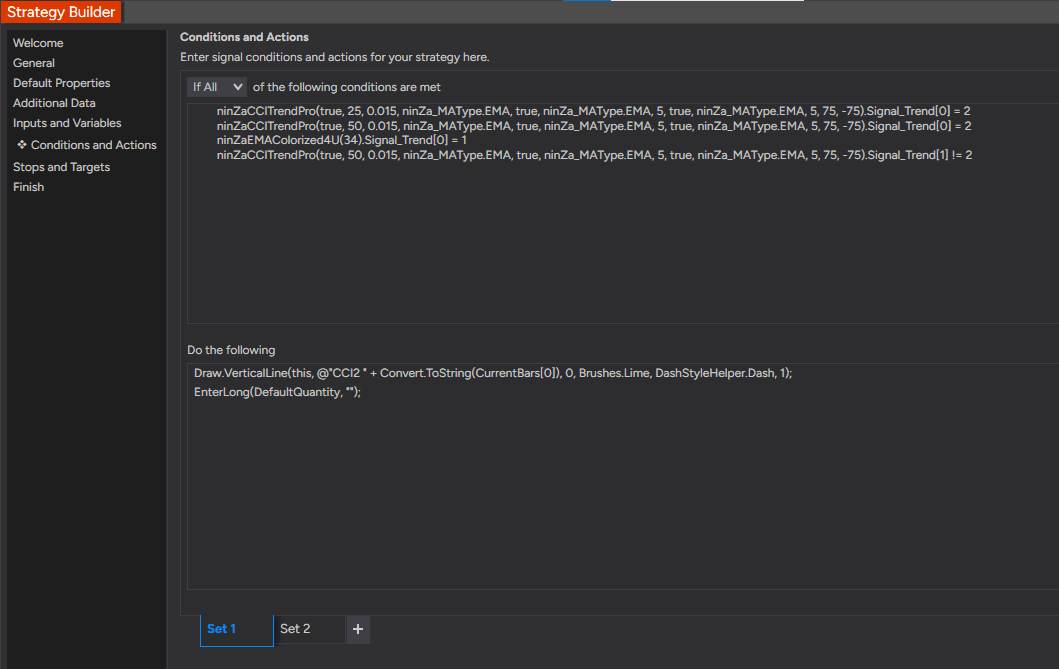
Double CCI Suite can be automated in NinjaTrader Strategy Builder. You can also use the NinjaTrader Strategy Analyzer to stress-test your logic over months of historical data.
Infinity Algo Engine$ is built for traders who need more than just signal alignment. It is designed to handle complex, multi-layered strategies where market context is as important as the signal itself.
If your goal is to automate the Double CCI setup based on direct signal convergence (Easy Trend + CCI Trend Pro #1 + CCI Trend Pro #2), Captain Optimus Strong can be the optimal solution.
Explore more about Infinity Algo Engine$, Captain Optimus Strong v2 and available options here: https://ninza.co/new/double-cci
Historical Testing & Optimization
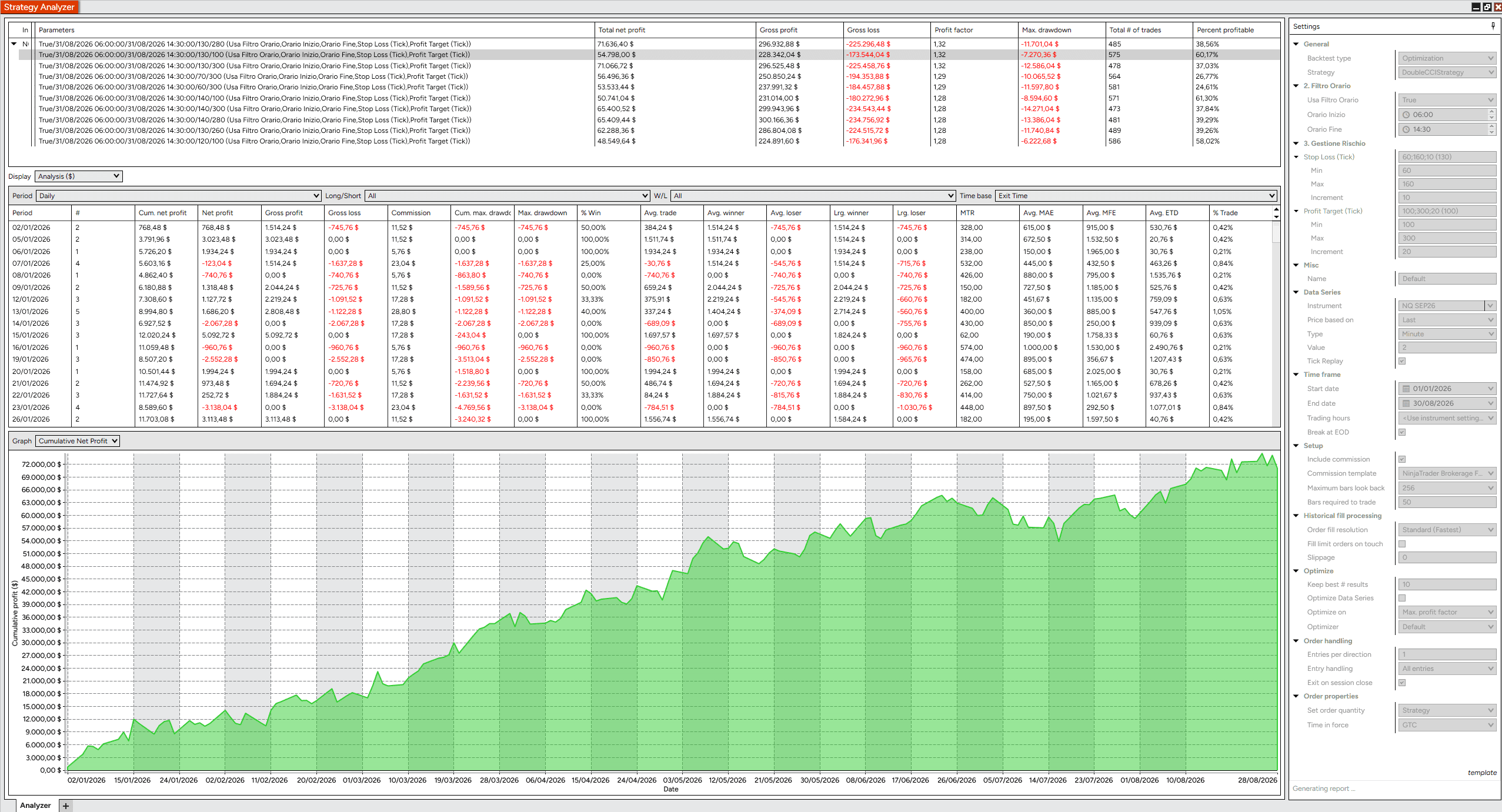
Antonino tested the Double CCI framework in NinjaTrader Strategy Analyzer to study how the logic behaved across different settings and historical market conditions.
Same strategy logic. Different CCI implementation.
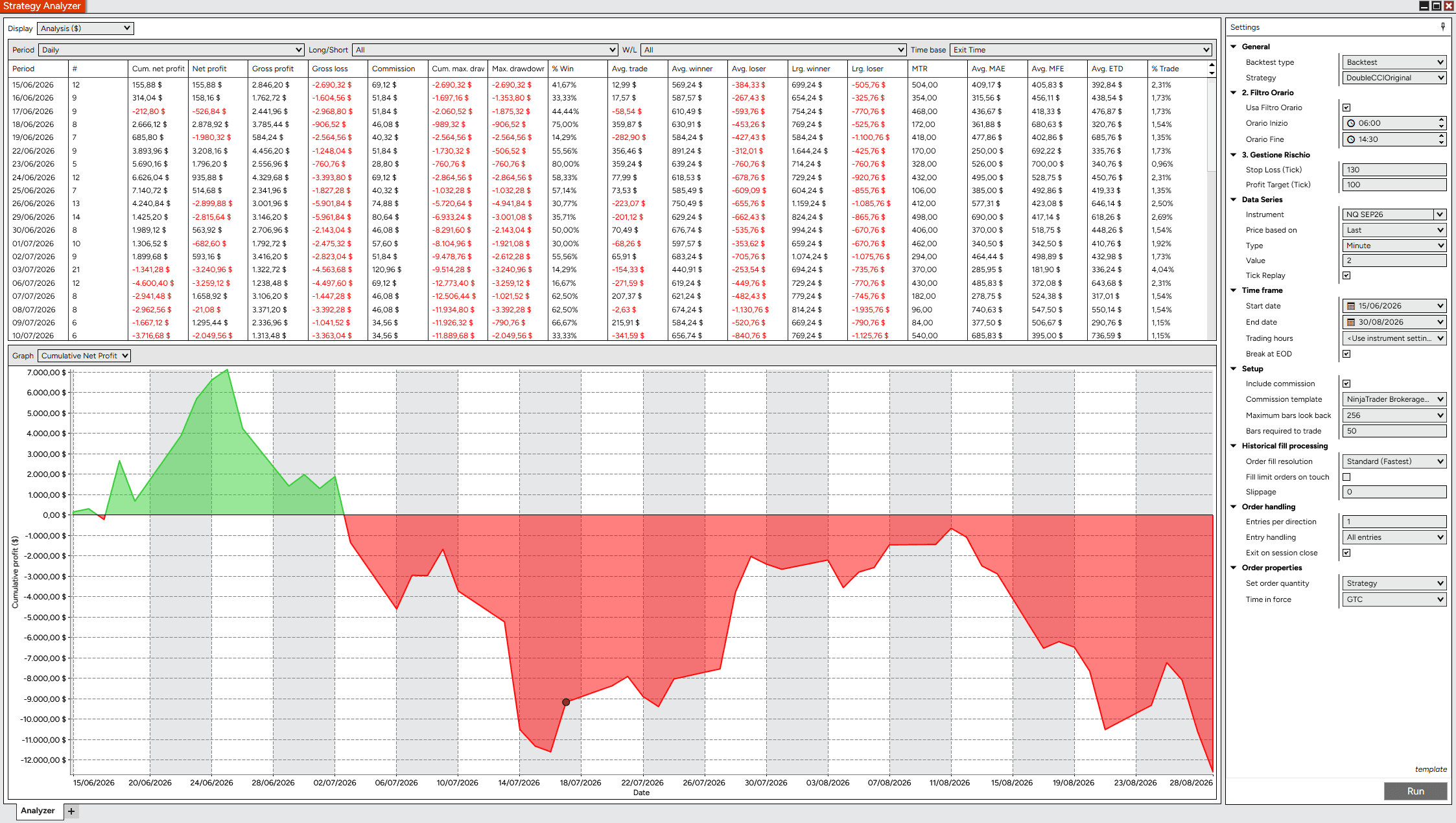
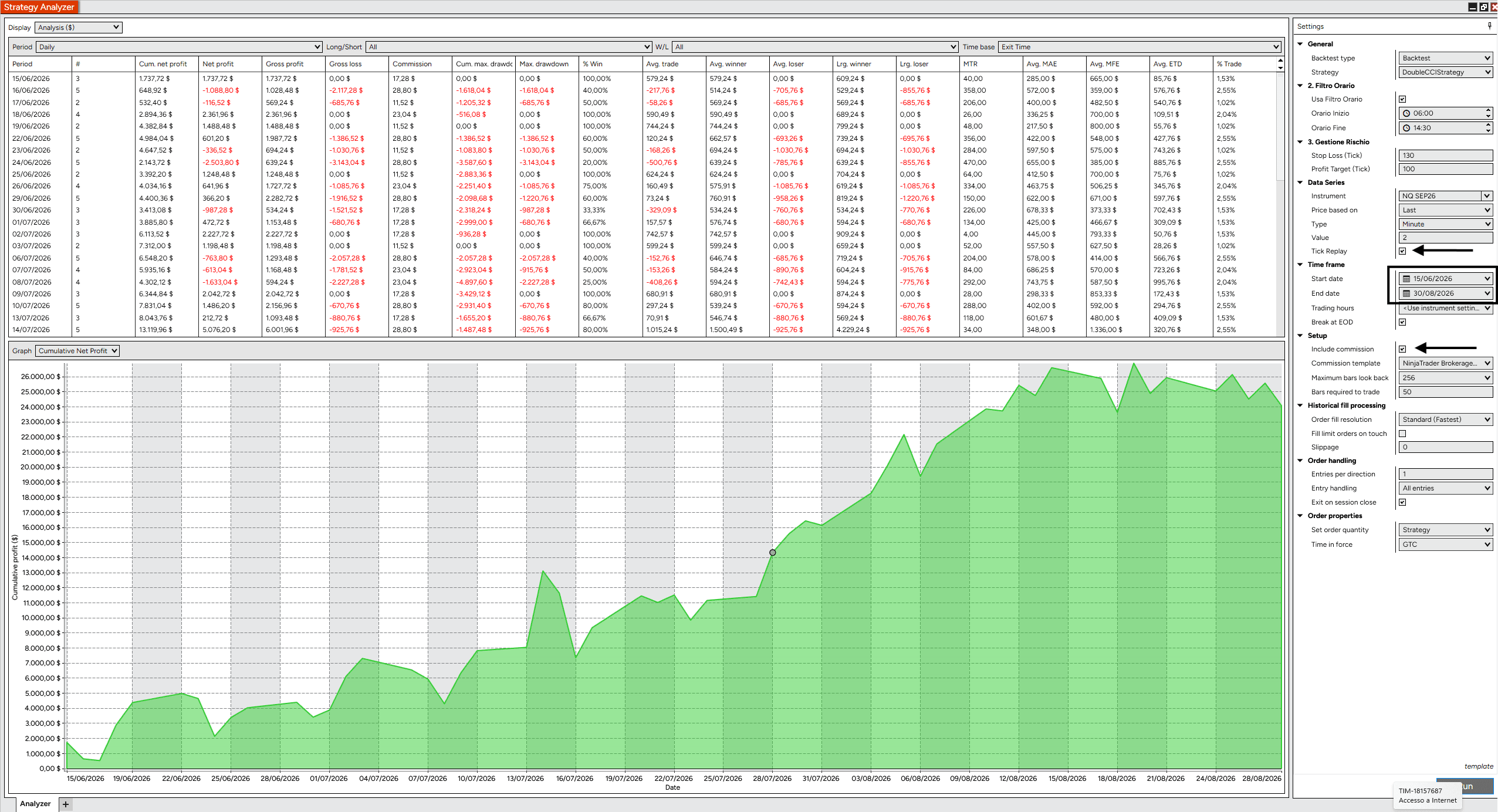
Antonino compared the same Double CCI strategy using NinjaTrader’s built-in CCI and NINZA CCI Trend Pro under matching test conditions.
NinjaTrader’s standard CCI does not provide the same smoothing control available in CCI Trend Pro, making this a useful comparison of how the CCI implementation can affect the historical Strategy Analyzer result.
Matching test conditions: NQ SEP26 · 2-minute chart · 06:00–14:30 Italian time · 130-tick Stop Loss · 100-tick Profit Target · Tick Replay enabled · Commissions included.
Optimization settings
Antonino then ran a broader Strategy Analyzer optimization to test how different Stop Loss and Profit Target combinations behaved under the same Double CCI entry logic.
Instrument
NQ SEP26
Chart
2-minute
Session
06:00–14:30 Italian time
Test period
Jan 1–Aug 30, 2026
Stop Loss range
60–160 ticks
Profit Target range
100–300 ticks
Optimization objective
Max Profit Factor
Historical test
Tick Replay enabled · Commissions included
From optimization to a selected backtest
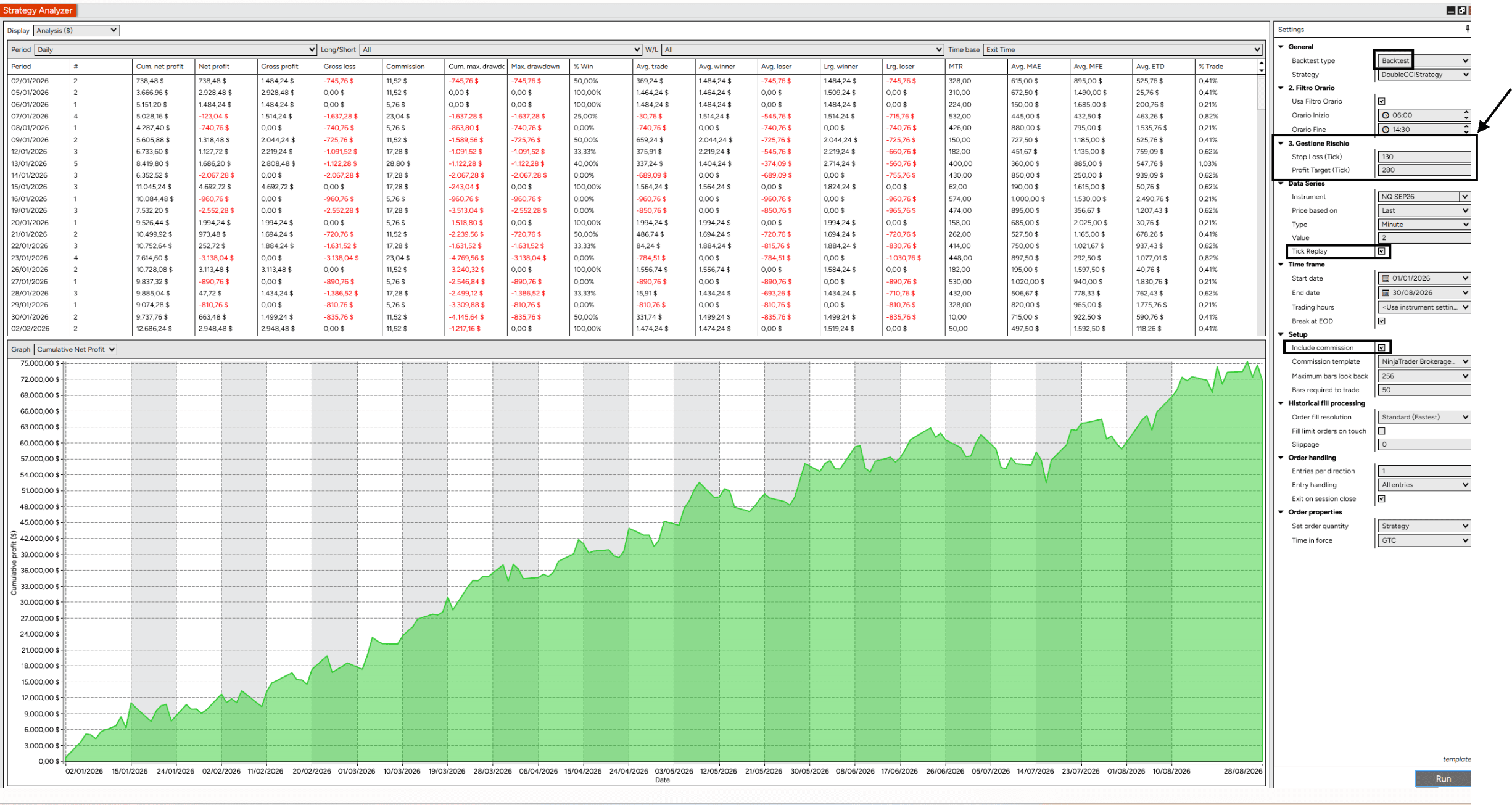
After reviewing the optimization results, Antonino selected a 130-tick Stop Loss and 280-tick Profit Target configuration and ran it as an individual Strategy Analyzer backtest.
Stop Loss: 130 ticks
Profit Target: 280 ticks
Chart: 2-minute NQ
Session: 06:00–14:30 Italian time
Tick Replay: Enabled
Commission: Included
Historical Strategy Analyzer result: $71,636.40 total net profit · 1.32 Profit Factor · -$11,700.14 max drawdown · 485 trades · 38.56% profitable.
These are historical Strategy Analyzer results shown for research purposes. They do not guarantee future trading performance.
Earlier Double CCI examples & Strategy Analyzer sample
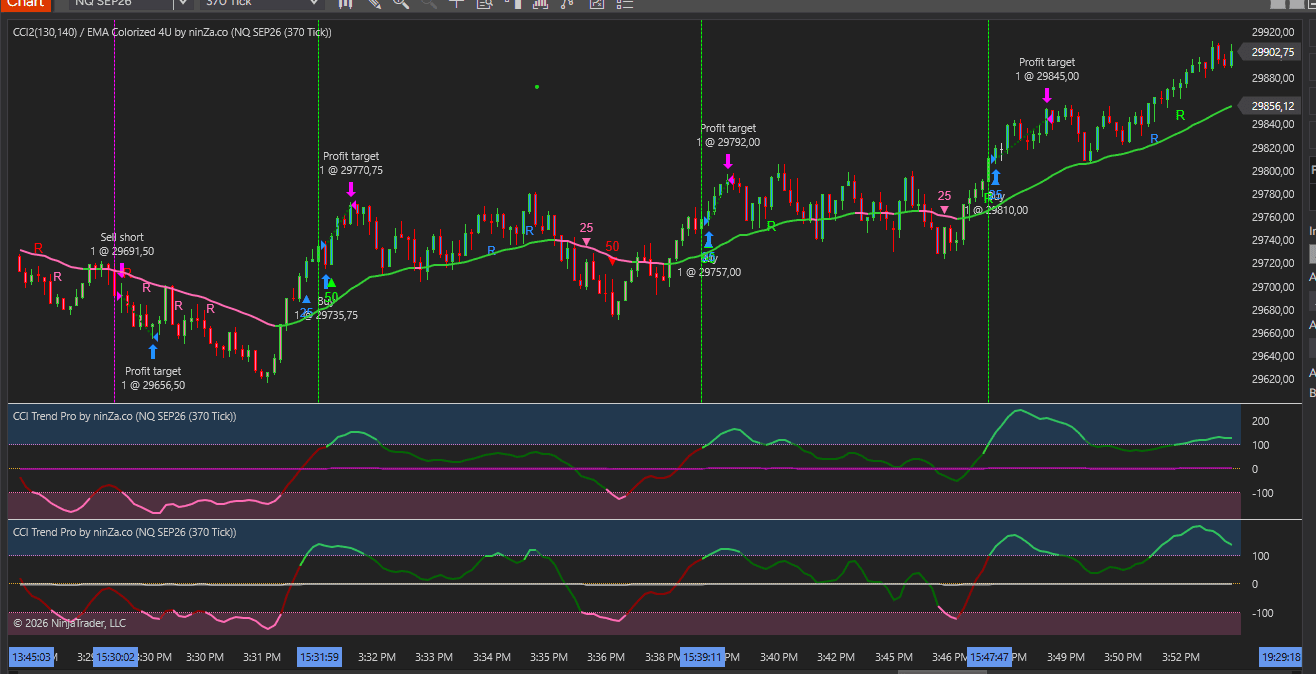
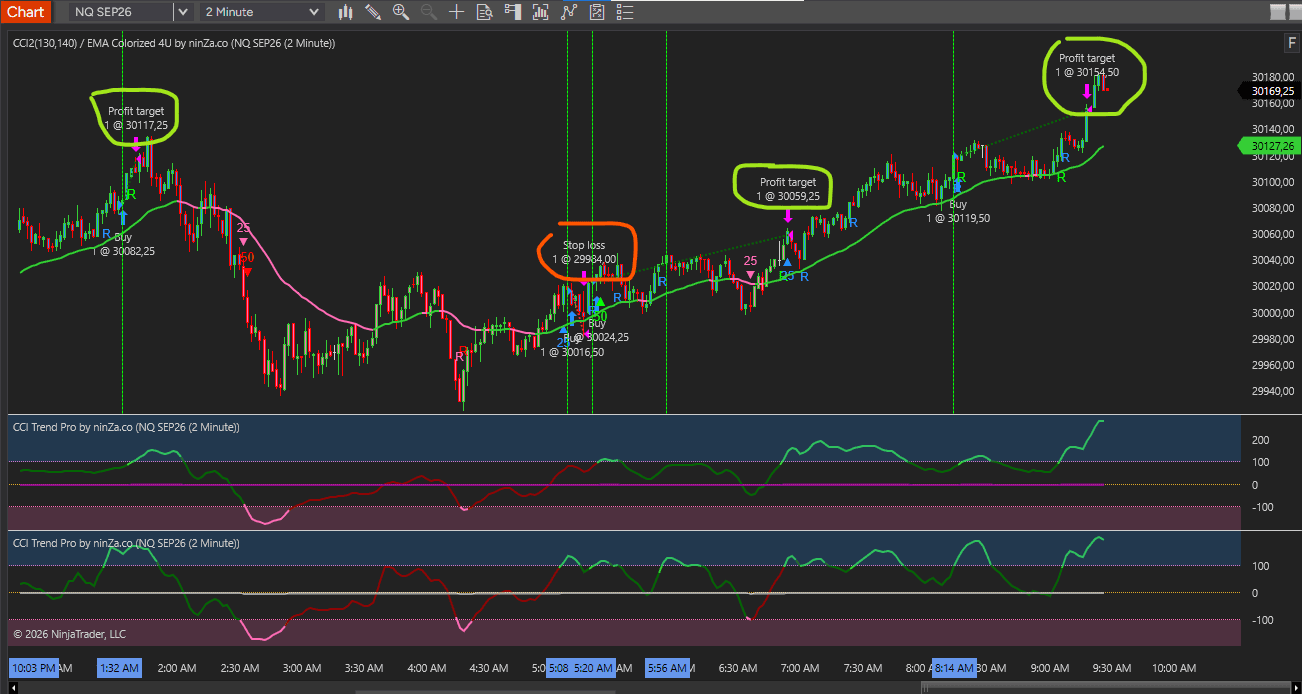
Antonino also shared earlier chart examples and a six-month Strategy Analyzer sample as additional historical context.
Together, these tests provide a clearer view of how the Double CCI logic can be studied, adjusted, and evaluated across different parameter configurations.
Product Media
Watch the indicator in action. Step-by-step guides, live trading, and feature overviews.
Policies
Software license
Every purchase includes a perpetual software license, granting you the right to use the software indefinitely on the number of computers permitted by your license.
Installation & Onboarding
Every purchase includes guided installation assistance. Purchases with Premium Services also include white-glove software setup and onboarding, along with personalized trading setup and workflow optimization.
Software updates & upgrades
Software updates & upgrades are provided at no additional cost. For products with a modular structure, this coverage applies to the core product, while optional expansion modules may be offered separately. Read the full policy
Customer service
Every purchase includes lifetime support via email & chat, delivered by our renowned Customer Care team – widely recognized throughout the trading community for its world-class service. As your NINZA product collection expands, Premium Path unlocks a growing range of enhanced Customer Care benefits & privileges, available through dedicated channels. Explore Premium Path
Remote assistance
Every purchase includes up to 3 complimentary remote assistance sessions, available within 30 days of purchase – with each session lasting up to 30 minutes. Purchases with Premium Services include up to 6 sessions within 60 days of purchase, with priority scheduling and longer session durations.
Product exchange
Customers may request up to 3 product exchanges within 30 days of purchase, at little or no additional cost when exchanging for a comparable product. Read the full policy
Returns & refunds
Due to the ease with which software products can be stored and copied, no returns will be accepted and no refunds will be issued. ALL SALES ARE FINAL & NON-REFUNDABLE.
Community Perspectives
From individual traders to pros and institutional trading teams... Trusted worldwide! Read traders' thoughts
4.9
Based on 800+ authentic reviews
M.
Indicators Improved My Charts. Hannah's Help And Great Customer Service. Will Buy Again.
I have been using the ninZa.co indicators for several months now and am very happy with what a valuable addition they have been to my charts. I recently decided to add one of the recently released indicators from ninZa.co. But after using for a few days, it wasn’t quite what I had been looking for. I contacted ninZa.co and had the pleasure of working with Hannah for an exchange to a different one of the many available indicators. At the time, the indicator I wanted to purchase to replace the one I had recently bought was on sale. Hannah put through an exchange and without my having to ask, gave me the advantage of the sale price. She also included a pdf that provided education about the indicator I chose to switch to. Any time I have had contact with one of the associates from ninZa.co, I have received excellent customer service, and will not hesitate to purchase from them again.
Bartosz
Grace Goes Above And Beyond: A Customer Support Experience That Exceeds Expectations!
Thank You, Grace! Your support is extraordinary I wish all companies have such great support. Keep going I’m 200% satisfied.
Kari L.
ConnorsRSI Pro With Grace's Outstanding Customer Service
Thank you very much for your excellent customer service, Grace! You are doing an excellent job making customers' lives much easier.
T.
An Exemplary Customer Experience At NinZa.Co: Unveiling The Power Of Cumulative Delta
I'm a new customer with ninZa.co and i was needing help today in making a purchase. I made a request on your chat platform and Hannah came to my rescue. She helped me find the what I needed and even offered me a discount. Everything went very smoothly from that point. I made the purchase and she even provided me some documentation on the indicator. I am very pleased with her assistance. Thanks again Hannah for your excellent customer service !!
Mike W.
Smart Ruler
I use ninZa.co's Smart Ruler every day !!! It is on all charts and helps me a great deal. Smart Ruler is one great tool for NinjaTrader !!!!!!!
A. B.
The indicator is working perfectly
The indicator is working perfectly. You guys are the best - Purchased Smart Zoom + Supply/Demand Discovery
Sandeep Rao
Awesome Indicator And Pi Rocks
This is my story, I ordered the Day Range indicator for NIFTY India. To my dismay, it didn't work well as it calculated ranges in ticks. I asked Larry Pi if there was a workaround, and he created a new version with all the choices for range unit: points, ticks, pips. He was with me all through the process, with very short turnaround cycles. So don't hesitate at all to pick what you want! You won't regret.
J.
Grateful For Excellent Support From Hannah!
Hi Hannah, Thank you for your great support. You got back to me right away, provided links to solve the problem, and they worked great! All is well that ends well, and your kind and more than adequate support ended very well! Thanks.
David P. From Connecticut
- Purchased Supply/Demand Discovery + TDI Pro + Solar Wind + Intraday Adaptive S/R + Ruby River + Market Profile (Daily) + Day Range
Just got your new Supply/Demand Discovery and it is truly a great improvement over everything else on the market. It will take me days to determine the best values for the variables for my different charts, but it will be worth the effort.
Research Domains
Full spectrum of trading intelligence across diverse domains. Explore all domains
Statistics & Quant
Turn market data into measurable insight
Use data, statistics, and quantitative models to measure market behavior and identify meaningful patterns. Turn these insights into data-driven signals, probabilities, and trading decisions.
Supply & Demand
Spot where supply or demand takes control
Analyze buying and selling pressure to identify where supply or demand dominates. Anticipate potential price reactions and uncover higher-probability trading opportunities around these areas.




_1787026707358.svg)