[25 Jun] Captain Optimus Strong v2: Trader feedback shaped this upgrade - Explore solution
[22 Jun] Highway Fractal Zone: Support & Resistance needs more than a swing - Explore solution
[12 Jun] ICT PhantomTrace: Why most ICT traders keep falling short - Explore solution
[03 Jun] BigTrade Sweep: Detecting Big Trades in every candle - Explore solution
[8 May] New Horizon: A new standard in intraday automated trading ☀️ - Explore solution
[27 Apr] DeepStack Confluence: Multi-Timeframe & Multi-Indicator confluence in 1 chart - Explore solution
Product Description
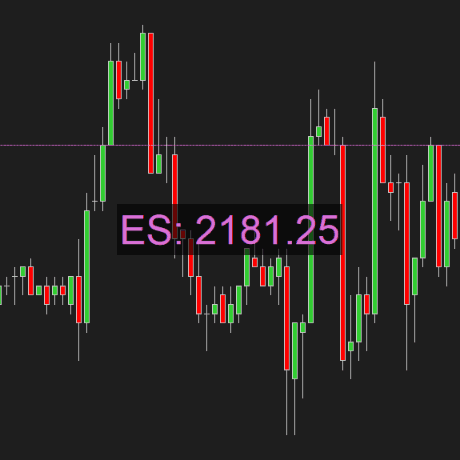
Price Tracker provides you with useful ways to track the market price.
FAQs
1. How can Price Tracker for NinjaTrader 8 help traders?
The Price Tracker indicator for NinjaTrader 8 helps traders track market prices. It offers a customizable horizontal price line and allows price text placement in five positions: bottom right, bottom left, top right, top left, or center for easy visibility.
2. How do I add a NinjaTrader price line?
To enable the price line indicator on your chart, follow these steps:
- Step 1: Right-click on the chart and select "Indicators."
- Step 2: Find "Price Tracker" in the top left and double-click it to add it to the "Configured" section.
- Step 3: Click "OK".
ninZa.co also offer a selection of free NinjaTrader 8 indicators – worth exploring if you're looking to expand your trading toolkit at no cost.
Key Features
- Print a horizontal price line which is fully customizable
- Print a customizable price text at 1 of 5 chart positions: bottom right, bottom left, top right, top left, center
- Support fractional price format for ZB, ZF, ZN…
- Let you recolorize the price marker with your favorite color NT8 only
Product Media
These media materials may have been recorded/captured in favorable markets. Please review our “acceptable marketing practices”.
Images
From Happy Customers
by M.
Indicators Improved My Charts. Hannah's Help And Great Customer Service. Will Buy Again.
I have been using the ninZa.co indicators for several months now and am very happy with what a valuable addition they have been to my charts. I recently decided to add one of the recently released indicators from ninZa.co. But after using for a few days, it wasn’t quite what I had been looking for. I contacted ninZa.co and had the pleasure of working with Hannah for an exchange to a different one of the many available indicators. At the time, the indicator I wanted to purchase to replace the one I had recently bought was on sale. Hannah put through an exchange and without my having to ask, gave me the advantage of the sale price. She also included a pdf that provided education about the indicator I chose to switch to. Any time I have had contact with one of the associates from ninZa.co, I have received excellent customer service, and will not hesitate to purchase from them again.
by Bartosz
Grace Goes Above And Beyond: A Customer Support Experience That Exceeds Expectations!
Thank You, Grace! Your support is extraordinary I wish all companies have such great support. Keep going I’m 200% satisfied.
by Kari L.
ConnorsRSI Pro With Grace's Outstanding Customer Service
Thank you very much for your excellent customer service, Grace! You are doing an excellent job making customers' lives much easier.
by T.
An Exemplary Customer Experience At NinZa.Co: Unveiling The Power Of Cumulative Delta
I'm a new customer with ninZa.co and i was needing help today in making a purchase. I made a request on your chat platform and Hannah came to my rescue. She helped me find the what I needed and even offered me a discount. Everything went very smoothly from that point. I made the purchase and she even provided me some documentation on the indicator. I am very pleased with her assistance. Thanks again Hannah for your excellent customer service !!
See Highway Fractal Zone in real market conditions
→ Watch it scalp NQ with 9 winning trades in under 3 minutes.
ninZa.co Indicators
0 online
What indicator, system, or feature should we build next?
Tell us what you need →

Complete ICT workflow explained by James Buchman
🎬Watch webinar replay
Software Changelog
12 Nov 2021
- Massive changes, fixes, and improvements were made (display name, Z order).
25 Oct 2018
- The indicator was re-exported to be compatible with recent changes of the platform; the toolbar menu was removed.
14 Nov 2017
- Timeframe info was added.


![[July Exclusive] Liberty Edge Bundle](https://forestcms.nyc3.digitaloceanspaces.com/media/small_liberty-edge-bundle-hdhdh_1783139262484.png)