M.
Important Notes
Order Flow Presentation requires Tick Replay with Bid/Ask series enabled to function properly.
Please read Trader Manual to understand how this indicator works.
Intuitive & elegant NinjaTrader footprint chart
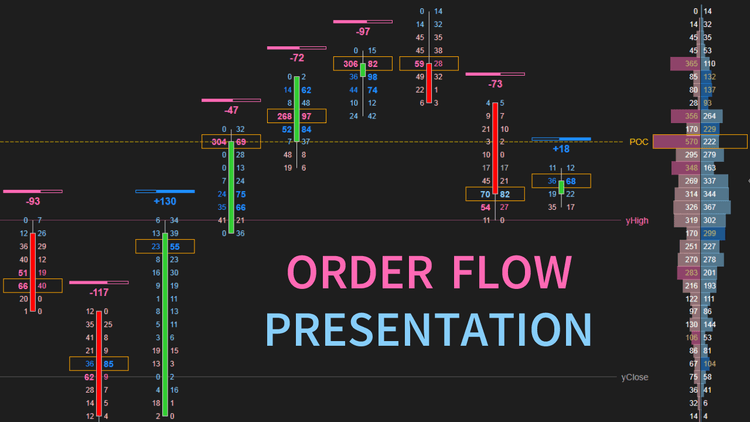
Are you looking for an awesome NinjaTrader footprint chart? We have one! ninZa.co's Order Flow Presentation indicator for NinjaTrader 8 makes order flow trading effective & enjoyable. With its intuitive and elegant interface, our NinjaTrader 8 footprint chart indicator is a big assistant for analyzing historical as well as real-time order flow.
As you already know, a footprint chart has been a must-have analysis tool for professional traders to acquire deep insights into each price bar, beyond just OHLC. It shows crucial extra information, such as buy/sell volumes and the flow of orders. Mastering the ins and outs of a NinjaTrader footprint chart will give you an edge over other traders in terms of knowing where aggressive sellers and buyers are, and where big orders are placed...
The NinjaTrader 8 footprint chart created by our Order Flow Presentation indicator is a multi-dimensional diagram that sheds light on additional market variables underneath a conventional candlestick chart. This super indicator presents an invaluable combo of market information including price, buy/sell volumes at prices, and the flow of orders within a bar. Therefore, Order Flow Presentation helps you understand who is in control of the market at any price level within any candle, hence facilitating your development of a great trading strategy.
Our Order Flow Presentation indicator for NinjaTrader 8 offers a large range of powerful, original features and high flexibility for configuration & customization. As a result, you are capable of customizing your NinjaTrader 8 footprint charts into the version that you feel most interested in and most comfortable with.
The NinjaTrader 8 footprint chart supplied by Order Flow Presentation will definitely facilitate your order flow trading activities and help you make trading decisions with precision and speed.

Key Features
- Print an order flow presentation for each bar, displayed in any of 4 styles: Table, Text, ProfileDivided, ProfileCombined
- Print a composite order flow presentation for today, displayed in any of 4 styles: Table, Text, ProfileDivided, ProfileCombined
- Offer 3 modes of volume base for selection: BidAskPrice_RealVolume, UpDownTick_RealVolume, UpDownTick_UnitVolume
- Function on both historical & real-time data (in BidAskPrice_RealVolume mode, you need to enable Tick Replay for the indicator to function on historical data)
- Let you define your favorite thresholds of strong volume & strong delta percentage
- Highlight strong volumes with a dedicated font
- Highlight rows of strong delta percentage with dedicated colors
- Print the volume delta of each bar
- Highlight the POC price of each bar
- Plot the POC series in off state
- Draw 5 levels: today POC, yesterday POC, yesterday close, yesterday low, yesterday high
- Allow quick on/off switch via a draggable & customizable toggle, WITHOUT reloading chart
Software Changelog
- 20 Aug 2024:The information rendering was optimized.
- 05 Feb 2021:Massive changes, fixes, and improvements were made (DPI, display name, Z order).
- 20 Apr 2019:The licensing system was critically upgraded.
Policies
Software license
Every purchase includes a perpetual software license, granting you the right to use the software indefinitely on the number of computers permitted by your license.
Installation & Onboarding
Every purchase includes guided installation assistance.
Purchases with Premium Services also include white-glove software setup and onboarding, along with personalized trading setup and workflow optimization.
Software updates & upgrades
Software updates & upgrades are provided at no additional cost.
For products with a modular structure, this coverage applies to the core product, while optional expansion modules may be offered separately.
Read the full policy
Customer service
Every purchase includes lifetime support via email & chat, delivered by our renowned Customer Care team – widely recognized throughout the trading community for its world-class service.
As your NINZA product collection expands, Premium Path unlocks a growing range of enhanced Customer Care benefits & privileges, available through dedicated channels.
Explore Premium Path
Remote assistance
Every purchase includes up to 3 complimentary remote assistance sessions, available within 30 days of purchase – with each session lasting up to 30 minutes.
Purchases with Premium Services include up to 6 sessions within 60 days of purchase, with priority scheduling and longer session durations.
Product exchange
Customers may request up to 3 product exchanges within 30 days of purchase, at little or no additional cost when exchanging for a comparable product.
Read the full policy
Returns & refunds
Due to the ease with which software products can be stored and copied, no returns will be accepted and no refunds will be issued.
ALL SALES ARE FINAL & NON-REFUNDABLE.