M.
Explore our complete collection of indicators for futures trading on NT8, organized by category so you can compare tools side by side.
NOTES:
- In the NT7 version: Potential low & high are only displayed for today's range (not available for past days). Additionally, they are just shown as horizontal lines instead of plots.
- You need to load enough days of data. For example, if you want to display the information of 20-day average range, please load at least 30 days of data (since weekends are also counted).
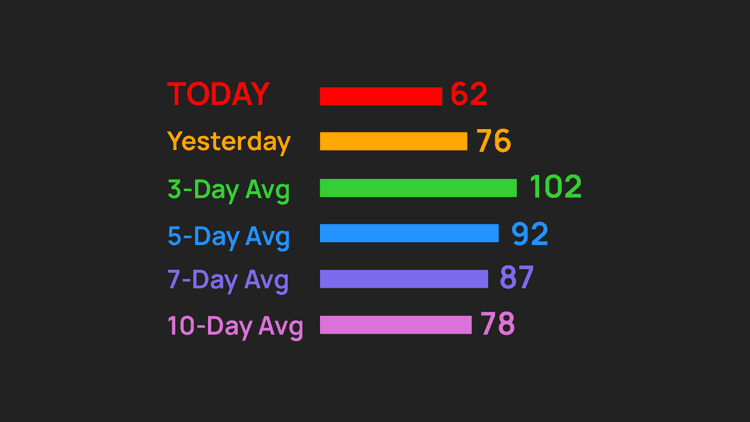
Do you want to have the following useful fact displayed nicely on your chart? Here comes the power of Day Range, a professional NinjaTrader daily range indicator. Let's take an example below.
The market moved 120 ticks per day on average for the last 3 days. Today it has climbed 50 ticks in a strong uptrend. → There is a potential room for a further rise of 70 ticks that may happen in the rest of the day.
Key Features
- Display a professional table of today's developing range and previous days' average ranges for easy reading & comparison
- Support 3 options for range unit: point, tick, pip
- Support up to 5 options for lookback
- Allow flexible positioning of the table at any of 4 chart corners
- Draw potential low & high based on the reference range you choose (calculation: potential low & high are anticipated levels that the price has to reach so that today's range equals the reference range)
- Display potential low & high as plots NT8 only
- Plot potential center (the average of potential low & high) NT8 only
- Let you choose session break or any custom time as the start time of a day
- Be NinjaScript ready for advanced usage, only restricted by your imagination NT8 only
Software Changelog
- 09 Mar 2021:Massive changes, fixes and improvements were made (DPI, display name, Z order).
- 27 Apr 2019:The licensing system was critically upgraded.
- 14 Sep 2018:The indicator was re-exported to be compatible with recent changes of the platform; the toolbar menu was removed.
Policies
Software license
Every purchase includes a perpetual software license, granting you the right to use the software indefinitely on the number of computers permitted by your license.
Installation & Onboarding
Every purchase includes guided installation assistance.
Purchases with Premium Services also include white-glove software setup and onboarding, along with personalized trading setup and workflow optimization.
Software updates & upgrades
Software updates & upgrades are provided at no additional cost.
For products with a modular structure, this coverage applies to the core product, while optional expansion modules may be offered separately.
Read the full policy
Customer service
Every purchase includes lifetime support via email & chat, delivered by our renowned Customer Care team – widely recognized throughout the trading community for its world-class service.
As your NINZA product collection expands, Premium Path unlocks a growing range of enhanced Customer Care benefits & privileges, available through dedicated channels.
Explore Premium Path
Remote assistance
Every purchase includes up to 3 complimentary remote assistance sessions, available within 30 days of purchase – with each session lasting up to 30 minutes.
Purchases with Premium Services include up to 6 sessions within 60 days of purchase, with priority scheduling and longer session durations.
Product exchange
Customers may request up to 3 product exchanges within 30 days of purchase, at little or no additional cost when exchanging for a comparable product.
Read the full policy
Returns & refunds
Due to the ease with which software products can be stored and copied, no returns will be accepted and no refunds will be issued.
ALL SALES ARE FINAL & NON-REFUNDABLE.