M.
Overview
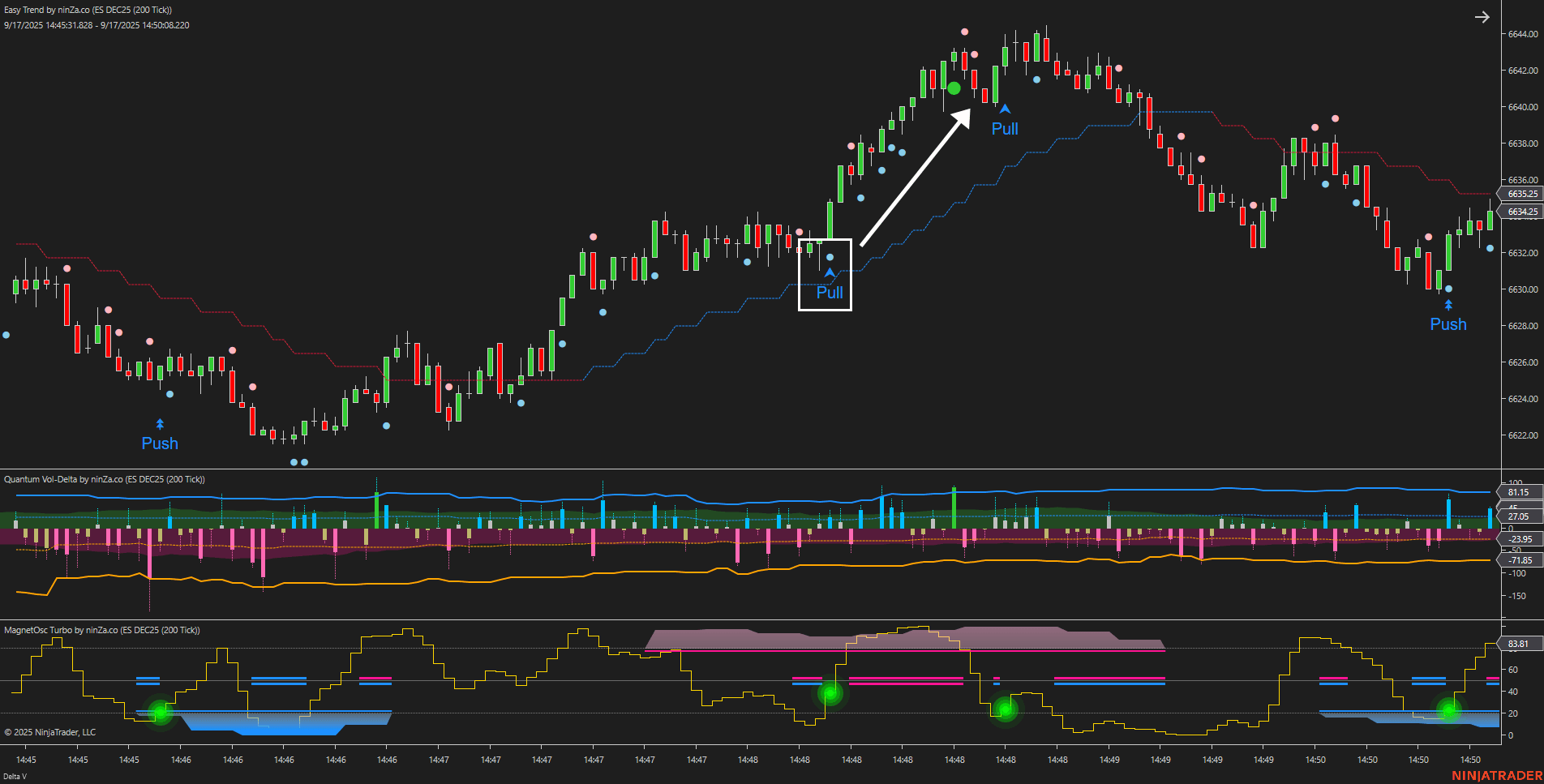
The Winged Tiger Trading package combines 3 carefully selected NinjaTrader 8 indicators to help you identify pullbacks with greater reliability.Â
This package includes:
- Easy Trend: Determines the dominant market direction, keeping your trades aligned with the prevailing trend.
- MagnetOsc Turbo: Provides reversal signals that serve as entry triggers, analyzing overbought/oversold momentum across 2 timeframes
- Quantum Vol-Delta: Measures real-time buy/sell pressure with adaptive Delta thresholds, highlighting when aggressive buy/sell pressure confirms or challenges a potential trade.
By using Easy Trend to define the market direction, reversal signals from MagnetOsc Turbo are interpreted as pullbacks within the trend, giving you higher-confidence entry points.
Â
Strategy checklist
The Winged Tiger Trading package follows a Trend Following approach. Below is a summary of the entry and exit rules for each trade type:
Entry | Easy Trend | MagnetOsc Turbo | Quantum Vol-Delta | Exit |
| BUY | Uptrend | Bullish signal | Buy-side pressure appears near the bullish signal | Exit when sustained sell-side pressure emerges |
| SELL | Downtrend | Bearish signal | Sell-side pressure appears near the bearish signal | Exit when sustained buy-side pressure emerges |
Example (Buy setup)

- Easy Trend signals an uptrend â wait for a bullish signal and buy-side pressure to form.
- When MagnetOsc Turbo generates a bullish (pullback) signal and Quantum Vol-Delta confirms nearby buying pressure â enter a Buy trade.
- Exit the Buy position when sustained selling pressure appears.
The Winged Tiger Trading package streamlines trend-following by combining trend direction, momentum analysis, and buy/sell pressure confirmation. This multi-angle approach helps you enter pullbacks with clarity and exit trades efficiently, reducing guesswork.
Software Changelog
- 20 Sep 2025:The package was released.
Policies
Software license
Every purchase includes a perpetual software license, granting you the right to use the software indefinitely on the number of computers permitted by your license.
Installation & Onboarding
Every purchase includes guided installation assistance.
Purchases with Premium Services also include white-glove software setup and onboarding, along with personalized trading setup and workflow optimization.
Software updates & upgrades
Software updates & upgrades are provided at no additional cost.Â
For products with a modular structure, this coverage applies to the core product, while optional expansion modules may be offered separately.
Read the full policy
Customer service
Every purchase includes lifetime support via email & chat, delivered by our renowned Customer Care team â widely recognized throughout the trading community for its world-class service.
As your NINZA product collection expands, Premium Path unlocks a growing range of enhanced Customer Care benefits & privileges, available through dedicated channels.
Explore Premium Path
Remote assistance
Every purchase includes up to 3 complimentary remote assistance sessions, available within 30 days of purchase â with each session lasting up to 30 minutes.
Purchases with Premium Services include up to 6 sessions within 60 days of purchase, with priority scheduling and longer session durations.
Product exchange
Customers may request up to 3 product exchanges within 30 days of purchase, at little or no additional cost when exchanging for a comparable product.
Read the full policy
Returns & refunds
Due to the ease with which software products can be stored and copied, no returns will be accepted and no refunds will be issued.
ALL SALES ARE FINAL & NON-REFUNDABLE.