M.
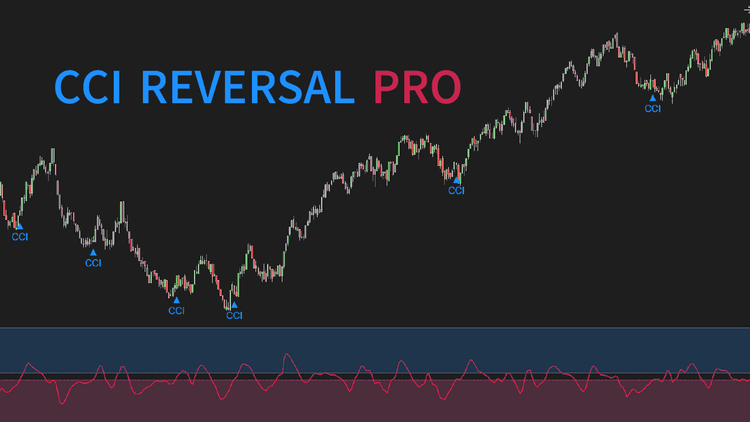
CCI is a famous classic indicator that offers many valuable uses. This indicator, CCI Reversal Pro, focuses on exploiting CCI's power in predicting trend reversals to high accuracy. The indicator lets you define a high region & a low region (e.g. above +150 and below -150). If CCI stays in the high or low region for minimally a user-defined number of bars, a reversal signal will print when CCI travels out of the high or low region. For example, if CCI stays above +150 for at least 10 bars (you define this number), then when CCI falls below +150 the indicator will signal a bearish reversal.
The "Late Mode" can be enabled so that CCI is required to exceed zero for a reversal signal to trigger. Besides its reversal functionality, this indicator also allows you to calculate CCI like never before. It gives you options to select MA type, configure multiplier, and smooth CCI (all of these are hard-coded or lacked in the traditional CCI version).
Order flow, volume profile, market structure, session tools, trade management â our library of indicators for NinjaTrader 8 is split into those five areas. Start with whichever gap you feel most.
Dedicated NinjaScript Signals
- Signal_State: 1 = high, -1 = low, 0 = middle
- Signal_Reversal: 1 = bullish, -1 = bearish, 0 = no signal
Key Features
- Plot CCI
- Allow configuring "Late Mode"
- Allow configuring multiplier
- Allow selecting from 11 popular moving averages
- Allow smoothing the moving average (with 11 popular moving averages)
- Allow smoothing CCI (with 11 popular moving averages)
- Highlight high & low regions
- Trigger alerts on reversal appearance
- Print markers on reversal appearance
- Be NinjaScript ready for advanced usage, only restricted by your imagination
- Expose dedicated NinjaScript signals
Software Changelog
- 21 Sep 2020:Massive changes, fixes and improvements were made (DPI, display name, Z order, alert properties, marker string, chart info, property naming/positioning/grouping); alert popup was visually enhanced.
- 14 Feb 2020:The indicator was released (build new).
Policies
Software license
Every purchase includes a perpetual software license, granting you the right to use the software indefinitely on the number of computers permitted by your license.
Installation & Onboarding
Every purchase includes guided installation assistance.
Purchases with Premium Services also include white-glove software setup and onboarding, along with personalized trading setup and workflow optimization.
Software updates & upgrades
Software updates & upgrades are provided at no additional cost.Â
For products with a modular structure, this coverage applies to the core product, while optional expansion modules may be offered separately.
Read the full policy
Customer service
Every purchase includes lifetime support via email & chat, delivered by our renowned Customer Care team â widely recognized throughout the trading community for its world-class service.
As your NINZA product collection expands, Premium Path unlocks a growing range of enhanced Customer Care benefits & privileges, available through dedicated channels.
Explore Premium Path
Remote assistance
Every purchase includes up to 3 complimentary remote assistance sessions, available within 30 days of purchase â with each session lasting up to 30 minutes.
Purchases with Premium Services include up to 6 sessions within 60 days of purchase, with priority scheduling and longer session durations.
Product exchange
Customers may request up to 3 product exchanges within 30 days of purchase, at little or no additional cost when exchanging for a comparable product.
Read the full policy
Returns & refunds
Due to the ease with which software products can be stored and copied, no returns will be accepted and no refunds will be issued.
ALL SALES ARE FINAL & NON-REFUNDABLE.