Replace manual 4-step order entry with one-click OCO bracket orders offset by a user-defined tick distance, built for range-bound, scalping, and volatile markets.
One-time investment
Early Black November pricing is now available.
Use coupon ZACCESS for an extra 5% in savings on eligible products. Explore Early Access
Need guidance? Contact sales
Perpetual license
Lifetime support
Free updates
30-day exchange
Part of a broad trading intelligence ecosystem comprising 300+ research projects and products.
Trusted by
60,000+ traders
worldwide
Reflected in
700+ verified
5-star reviews
Backed by
12 years of
research & innovation
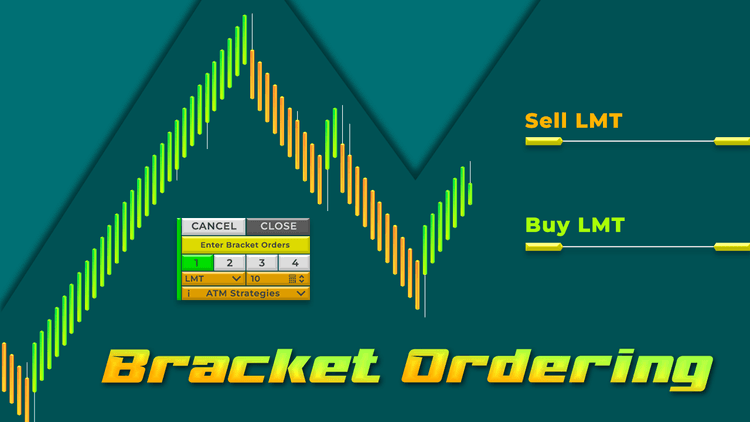
Bracket Ordering is designed to help you place a bracket order that includes 2 opposite-side pending orders with just one click. It incorporates the One Cancels the Other (OCO) feature. With this ordering tool, you can forget the cumbersome manual process of placing bracket orders, which typically requires 4 actions.
Each bracket order is offset from the current price by a specific number of ticks that you can define. This offset can be easily adjusted on the order line for each order.
The tool offers 4 types of pending orders: Limit (LMT), Stop (STP), Market If Touched (MIT), and Stop Limit (SLM). You can also select the number of contracts and the ATM strategy directly from the control panel, eliminating the need to navigate away to the chart trader.
For instance:
When you select a Stop (STP) pending order to enter the market, a high-side BUY STOP pending order and a low-side SELL STOP pending order will be bracketed together with one click. If the price rises and activates the BUY STOP pending order, a buy order will be executed, and the corresponding SELL STOP pending order will automatically be canceled. The reverse occurs if the price declines.
Scenarios for using Bracket Ordering
1. Sideways and Range-Bound Trading
In uncertain market conditions where the price moves within a defined range, such as in a sideways market, you can enhance your strategy by placing a buy pending order at the support level and a sell pending order at the resistance level. This approach enables you to trade in both directions and respond swiftly as the market hits either boundary.
Limit (LMT) orders are especially effective in these scenarios. If you anticipate that the price will approach resistance or support and potentially reverse, you can easily place a Buy LMT order at resistance and a Sell LMT order at support with just one click, eliminating the hassle of constant chart monitoring.
2. Breakout Trading
Breakout signals often offer high immediate reward potential, but it's challenging to enter the trade accurately because the price moves very quickly after confirming the breakout. This tool helps you act promptly, ensuring you seize opportunities early and avoid being caught off guard by sudden price swings.
3. Scalping Trading
Using Bracket Orders, you can quickly set up buy and sell pending orders at your chosen price levels in fast-moving markets, ensuring that every second counts in scalping. It allows you to actively adjust your strategy in real-time based on price movements. For instance, you can position a sell pending order close to the peak for Swing trading and a buy pending order at the support level, preparing for a Pullback trade when the price retraces.
4. Trading amid news-driven market conditions
When news is released, prices often experience sharp increases or decreases. In the face of these fluctuations, Bracket Ordering enables you to seize opportunities easily, entering trades at the right moment while automatically securing rewards or limiting losses when necessary. This not only helps protect your account but also optimizes your rewards during periods of significant market volatility.
Bracket Ordering enables you to focus more on your trading strategy rather than the mechanics of order entry. With the ability to set up a bracketed pending order with a single click, you can enhance your trading experience by simplifying the order placement process.
Watch the indicator in action. Step-by-step guides, live trading, and feature overviews.
Software Changelog
26 Oct 2024:The indicator was released (built new).
Policies
Software license
Every purchase includes a perpetual software license, granting you the right to use the software indefinitely on the number of computers permitted by your license.
Installation & Onboarding
Every purchase includes guided installation assistance. Purchases with Premium Services also include white-glove software setup and onboarding, along with personalized trading setup and workflow optimization.
Software updates & upgrades
Software updates & upgrades are provided at no additional cost. For products with a modular structure, this coverage applies to the core product, while optional expansion modules may be offered separately. Read the full policy
Customer service
Every purchase includes lifetime support via email & chat, delivered by our renowned Customer Care team – widely recognized throughout the trading community for its world-class service. As your NINZA product collection expands, Premium Path unlocks a growing range of enhanced Customer Care benefits & privileges, available through dedicated channels. Explore Premium Path
Remote assistance
Every purchase includes up to 3 complimentary remote assistance sessions, available within 30 days of purchase – with each session lasting up to 30 minutes. Purchases with Premium Services include up to 6 sessions within 60 days of purchase, with priority scheduling and longer session durations.
Product exchange
Customers may request up to 3 product exchanges within 30 days of purchase, at little or no additional cost when exchanging for a comparable product. Read the full policy
Returns & refunds
Due to the ease with which software products can be stored and copied, no returns will be accepted and no refunds will be issued. ALL SALES ARE FINAL & NON-REFUNDABLE.
Community perspectives
From individual traders to pros and institutional trading teams... Trusted worldwide! Read traders' thoughts
4.9
Based on 800+ authentic reviews
Christopher Heathman
Grace was AWESOME! taking care of me
I'm totally impressed with the following about ninZa.co service from all of the girls, but Grace is my favorite. Product knowledge and support. Great pricing. Always there to offer advice and get everything setup. Looking forward to using the new software. I'll comeback and write a review.
Samuel Grossman
ninZa.co has excellent customer Service
ninZa.co has excellent customer service. They are very helpful and go above and beyond. In my 30+ years of dealing with all kinds of companies, Ninza.co has the best customer service I have ever experienced.
I have been dealing with them for maybe 3 years or so now and I am continually impressed. I usually deal with Grace or Cute Flora. Both are fantastic. In my recent purchase Cute Flora went above and beyond for what she did for me, and it was greatly appreciated.
Samuel
Abhijit Banerjee
An Amazing Organization With Amazing People & Products
I have been with ninZa.co for many years now and over the years my trading method and objectives have changed and I have always found a product to make my trading better. The Customer Service from Hannah, Jennifer and the entire team is way beyond describing in words. They are constantly researching on ways to improve their indicators and how best to combine them for efficient and improved results. If you are clear in what kind of trading you do, then they will have something that will make your trading better.
Ben
Exceptional Responsiveness and Professional Communication: Prompt and thorough replies to my inquiries, demonstrating professionalism
ninZa.co is very responsive to my many questions and comments. I’ve sent their support folks numerous questions and have always received a reply within 24 hours. If it weren’t for the 11-hour time zone difference, I have no doubt they would respond even more quickly. They have always been very professional in their communication with me. Thanks, ninZa.co.
Steffie
Thank you for providing free indicators
The customer service is very helpful and it's great that I can have these indicators for free.
Lance S.
High-Quality Indicators and Outstanding Customer Service at ninZa.co
I have been purchasing and using indicators from ninZa.co since Larry Pi started his business with a website of about 10 indicators many years ago. And I have continued to purchase and use his indicators with additional purchases over the years. There are tons of trading vendors out there. Many I have tried and abandoned because they didn’t work and there was no customer service that I could easily email and get a prompt response for help.
What makes ninZa.co so special is not just the high quality of the indicators, but the outstanding customer service and help. I have been working with Grace over the last 6 months, and she has provided prompt, cheerful, and most importantly, high-quality customer service. Larry is lucky to have her on his team! GO GRACE!!
Jim
Excellent Support From Grace: Problem Solved!
I would say that you did a great job with the support you provided, Grace. Very eager to help and you solved my problems. Thank you again for your help.
Agbaje
Multi-Osc OB/OS Overlap, Solar Wind Plus KingRenko$ Bar With Outstanding Support From Miss Grace Lopez
I was struggling to set up my newly bought product in the name of Multi-Osc OB/OS Overlap, Solar Wind plus KingRenko$ bar I just bought it. As soon as I started the chart box, Miss Grace Lopez came to my rescue. She lead the way, connected to my computer with my permission, and set up my software without any problems. She was patient and kind. I am so grateful to her and truly appreciate her assistance. She is certainly an asset to your company. Hopefully, she will stick around longer and ninZa.co group of companies i.e. personnel will appreciate her contribution to the company. Once again, Thank you Miss Grace for your effort in solving my frustration at 2:00 Am in the morning.
Sigma Bob
Highly Recommended Service - Ms. Hannah
ninZa.co Hannah has provided timely service on information and purchases. Foreign support is generally complained about, but ninZa.co Hannah has been attentive and responsive to my email communications. For that I thank her and she reflects positively on ninZa.co.
Research Domains
Full spectrum of trading intelligence across diverse domains. Explore all domains
Support & Resistance
Find where price may turn or break
Identify key price areas where buying and selling pressure tend to react. Help traders recognize important levels for potential reversals, trend continuation, or breakouts, and plan trades around these key areas.
Analyze changes in price volatility to assess market conditions. Help traders identify consolidation and expansion phases while evaluating the potential for significant price movements.





_1787026707358.svg)






