M.
Please check out Trading Time Pro (the Pro edition of this freebie) for a whole lot of advanced features, graphical enhancements, and time alerts.
Every trader has his own favorite hunting time. For example, a trader may be interested in trading the London session and the US session.
What is NinjaTrader session indicator?
NinjaTrader session indicator is an indicator that highlights specific trading sessions on a chart. These indicators aid traders in analyzing price action and volume during defined periods.
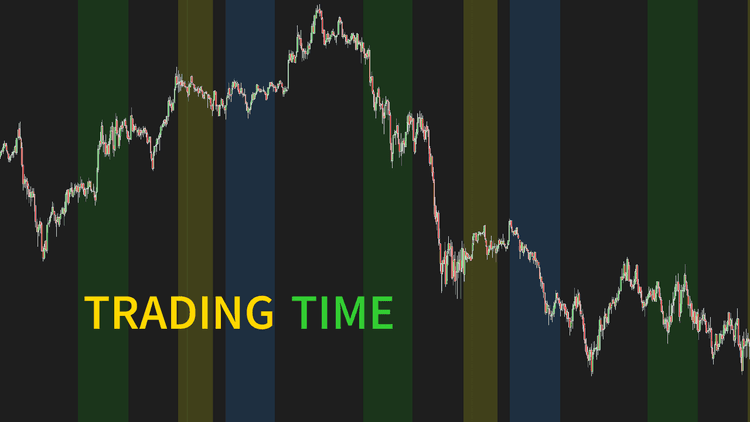
Trading Time highlights up to 3 custom times on your chart with user-defined background colors and opacity. It clearly segments intraday market sessions, whether focusing on market open/close times or targeting liquidity during trading.
Our advanced algorithm guarantees that time settings are 100% stable and compatible for all traders from around the world, wherever you are.
Is Trading Time the best NinjaTrader session indicator?
While ninZa.co canât claim Trading Time is the best session indicator for NinjaTrader, we strongly recommend it for scalpers and day traders. Two important notes:
- To define a trading time, you need to input a start time and a DURATION (not end time).
- In NT8 version, time and duration format is an integer of "hhmmss" form. For example, 193000 means 19h 30m 00s.
Otherwise, if you're looking to explore some free NinjaTrader 8 indicators, don't hesitate to check them out.

Key Features
- Allow defining up to 3 custom trading times
- Be compatible and stable with any timezones across the world
- Highlight each trading time with user-defined background and opacity
Software Changelog
- 30 Jul 2020:The indicator was released (converted from its NT7 version).
Policies
Software license
Every purchase includes a perpetual software license, granting you the right to use the software indefinitely on the number of computers permitted by your license.
Installation & Onboarding
Every purchase includes guided installation assistance.
Purchases with Premium Services also include white-glove software setup and onboarding, along with personalized trading setup and workflow optimization.
Software updates & upgrades
Software updates & upgrades are provided at no additional cost.Â
For products with a modular structure, this coverage applies to the core product, while optional expansion modules may be offered separately.
Read the full policy
Customer service
Every purchase includes lifetime support via email & chat, delivered by our renowned Customer Care team â widely recognized throughout the trading community for its world-class service.
As your NINZA product collection expands, Premium Path unlocks a growing range of enhanced Customer Care benefits & privileges, available through dedicated channels.
Explore Premium Path
Remote assistance
Every purchase includes up to 3 complimentary remote assistance sessions, available within 30 days of purchase â with each session lasting up to 30 minutes.
Purchases with Premium Services include up to 6 sessions within 60 days of purchase, with priority scheduling and longer session durations.
Product exchange
Customers may request up to 3 product exchanges within 30 days of purchase, at little or no additional cost when exchanging for a comparable product.
Read the full policy
Returns & refunds
Due to the ease with which software products can be stored and copied, no returns will be accepted and no refunds will be issued.
ALL SALES ARE FINAL & NON-REFUNDABLE.