M.
What is a NinjaTrader MACD Indicator?
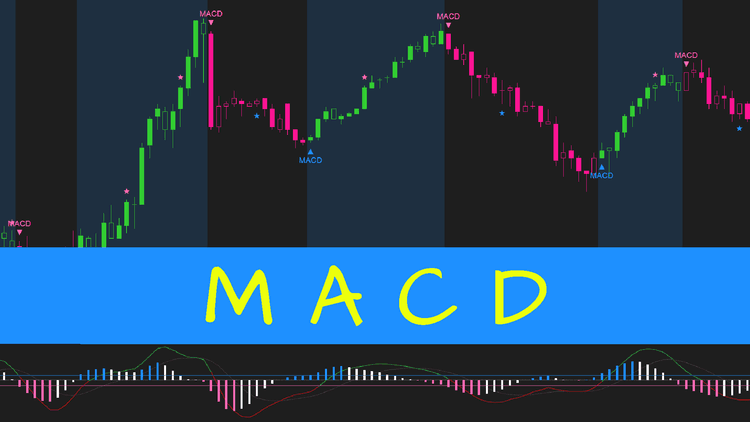
This is a classic indicator remade by ninZa.co. MACD is generally voted as the most-used classic indicator. We remade it by adding many useful graphical enhancements to help traders see important signals more easily.Â
ninZa.co also provide 10 popular moving average types for you to independently configure the fast MA, slow MA, and the signal line. Each of them can be smoothed with any of 10 smoothing methods. The most used signal out of MACD is a crossover between the MACD line and the signal line.Â
We tremendously enhanced this by switching to translate the histogram (the difference between the MACD line and the signal line). An upper threshold and a lower threshold (both are based on ATR) are applied to the histogram to help define trend phases efficiently:
- In an uptrend, the histogram must go below the lower threshold for the trend to switch to a downtrend.
- In a downtrend, the histogram must climb above the upper threshold for the trend to switch to an uptrend.
Highlights of Superior MACD
A wonderful feature of this NinjaTrader MACD indicator is trend slowdown detection, based on the number of histogram bars for slowdown scan you define.Â
Its default is 3, which means: if there are 3 consecutive positive decreasing bars, the uptrend experiences a slowdown; if there are 3 consecutive negative decreasing bars, the downtrend experiences a slowdown. Slowdowns are marked with dot symbols (). Zero crossovers are marked with arrow symbols (ââ).
In this indicator, ninZaATR is used (instead of regular ATR) for better performance. For your information, ninZaATR is ninZa.co's special ATR version that helps improve indicator performance significantly on intraday charts. It is also a standalone FREE indicator for ninZaFamily â https://ninza.co/product/ninzaatr.
Explore our full collection of NinjaTrader 8 indicators â each one built to support a different aspect of your trading, from trend following to volume analysis and beyond.

Dedicated NinjaScript Signals
- Signal_State: 2 = positive increase, -2 = negative increase, 1 = positive decrease, -1 = negative decrease, 0 = zero
- Signal_Trend: 1 = uptrend, -1 = downtrend
- Signal_Slowdown: 1 = downtrend slowdown, -1 = uptrend slowdown, 0 = no slowdown
- Signal_ZeroCrossover: 1 = MACD above zero, -1 = MACD below zero
Key Features
- Plot MACD line, signal line and the difference between those 2 lines
- Allow independently configuring fast MA, slow MA, signal line with 11 popular moving averages
- Allow independently smoothing fast MA, slow MA, signal line with 11 popular moving averages
- Allow specifying the number of bars for slowdown scan
- Add an upper threshold for filtering positive difference and a lower threshold for filtering negative difference, both of which are ATR-based
- Colorize the difference plot in 4 different colors: positive increase, positive decrease, negative increase, negative decrease
- Paint background to clearly show uptrend vs downtrend
- Colorize bars based on 2 phases: uptrend, downtrend
- Trigger alerts on trend shift
- Trigger alerts on trend slowdown
- Trigger alerts on zero crossover
- Print markers on trend shift
- Print markers on trend slowdown
- Print markers on zero crossover
- Be NinjaScript ready for advanced usage, only restricted by your imagination
- Expose dedicated NinjaScript signals
Software Changelog
- 14 Sep 2020:A minor issue with "soundPath" was fixed.
- 03 Sep 2020:Massive changes, fixes and improvements were made (DPI, display name, Z order, alert properties, marker string, bar painting, chart info, property naming/positioning/grouping); regular ATR was replaced with ninZaATR for better performance
- 19 Aug 2019:The indicator was released (build new).
Policies
Software license
Every purchase includes a perpetual software license, granting you the right to use the software indefinitely on the number of computers permitted by your license.
Installation & Onboarding
Every purchase includes guided installation assistance.
Purchases with Premium Services also include white-glove software setup and onboarding, along with personalized trading setup and workflow optimization.
Software updates & upgrades
Software updates & upgrades are provided at no additional cost.Â
For products with a modular structure, this coverage applies to the core product, while optional expansion modules may be offered separately.
Read the full policy
Customer service
Every purchase includes lifetime support via email & chat, delivered by our renowned Customer Care team â widely recognized throughout the trading community for its world-class service.
As your NINZA product collection expands, Premium Path unlocks a growing range of enhanced Customer Care benefits & privileges, available through dedicated channels.
Explore Premium Path
Remote assistance
Every purchase includes up to 3 complimentary remote assistance sessions, available within 30 days of purchase â with each session lasting up to 30 minutes.
Purchases with Premium Services include up to 6 sessions within 60 days of purchase, with priority scheduling and longer session durations.
Product exchange
Customers may request up to 3 product exchanges within 30 days of purchase, at little or no additional cost when exchanging for a comparable product.
Read the full policy
Returns & refunds
Due to the ease with which software products can be stored and copied, no returns will be accepted and no refunds will be issued.
ALL SALES ARE FINAL & NON-REFUNDABLE.