M.
 B uild a solid NinjaTrader Bollinger Bands strategy
with Superior Bollinger
Bollinger Bands is one of the most popular indicators in the world of trading as traders can use it in different ways to build effective NinjaTrader Bollinger Bands strategies.
Depending on the trading style of each trader, a NinjaTrader Bollinger Bands strategy can be designed for range-trading or trend-trading purposes. Bollinger Bands gives you a perspective on the price and volatility of a specific financial instrument. This classic technical indicator consists of a moving average which is also called the middle band, and an upper band & a lower band placed at an offset from the middle band, where the offset is calculated in the Standard Deviation unit.
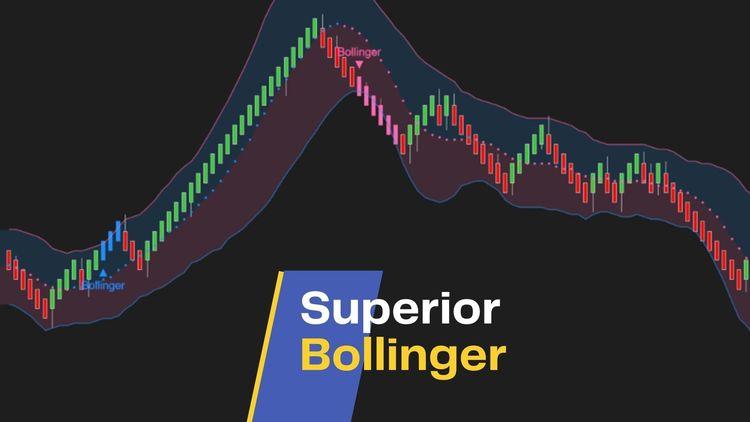
Our Superior Bollinger indicator is a remake of this classic indicator, supplying 11 popular moving averages for the moving average definition and smoothing configuration, with which you can research & test to build a successful NinjaTrader Bollinger Bands strategy to your wishing.
One of the common NinjaTrader Bollinger Bands strategies is the overbought/oversold trading strategy. When the price of a particular instrument crosses below the lower band and then starts bouncing up, a buy signal appears. When the price breaks above the upper band and then starts falling, a sell signal occurs. It is worth noting that this popular NinjaTrader Bollinger Bands strategy only works effectively during range-bound markets. It is a highly risky strategy during a trending period.
You can profit from another useful NinjaTrader Bollinger Bands strategy which is called the Bollinger squeeze. A squeeze happens when the volatility of the market drops to a low level, corresponding to a period of narrow Bollinger Bands width. It is well-known that periods of low volatility often lead to periods of high volatility or trend explosion. Therefore, a volatility reduction or a tight width of Bollinger Bands can forecast a significant rise or fall in price. With a squeeze and a later break above the upper band, the strategy indicates a buy signal. On the other hand, with a squeeze and a following break below the lower band, a sell signal appears.
Combining Superior Bollinger with other technical NinjaTrader addons can help you establish a comprehensive trading strategy.

Dedicated NinjaScript Signals
- Signal_State: 1 = above upper band, -1 = below lower band, 0 = inside
Key Features
- Plot the traditional Bollinger bands
- Allow choosing any of 11 popular moving averages for the calculation of middle band
- Allow smoothing the middle band (with 11 popular moving averages)
- Allow colorizing the bands based on slope
- Allow painting the cloud between upper band and lower band (with 2 different colors for upper part & lower part) NT8 only
- Trigger alerts on Bollinger bands breakout
- Print markers on Bollinger bands breakout
- Colorize bars on Bollinger bands breakout NT8 only
- Be NinjaScript ready for advanced usage, only restricted by your imagination NT8 only
- Expose dedicated NinjaScript signals NT8 only
Software Changelog
- 17 Mar 2021:Massive changes, fixes and improvements were made (DPI, display name, Z order, alert properties, marker string, bar painting, chart info, property naming/positioning/grouping).
- 23 Jul 2019:Sound selector was fixed.
- 21 Apr 2019:The licensing system was critically upgraded.
Policies
Software license
Every purchase includes a perpetual software license, granting you the right to use the software indefinitely on the number of computers permitted by your license.
Installation & Onboarding
Every purchase includes guided installation assistance.
Purchases with Premium Services also include white-glove software setup and onboarding, along with personalized trading setup and workflow optimization.
Software updates & upgrades
Software updates & upgrades are provided at no additional cost.Â
For products with a modular structure, this coverage applies to the core product, while optional expansion modules may be offered separately.
Read the full policy
Customer service
Every purchase includes lifetime support via email & chat, delivered by our renowned Customer Care team â widely recognized throughout the trading community for its world-class service.
As your NINZA product collection expands, Premium Path unlocks a growing range of enhanced Customer Care benefits & privileges, available through dedicated channels.
Explore Premium Path
Remote assistance
Every purchase includes up to 3 complimentary remote assistance sessions, available within 30 days of purchase â with each session lasting up to 30 minutes.
Purchases with Premium Services include up to 6 sessions within 60 days of purchase, with priority scheduling and longer session durations.
Product exchange
Customers may request up to 3 product exchanges within 30 days of purchase, at little or no additional cost when exchanging for a comparable product.
Read the full policy
Returns & refunds
Due to the ease with which software products can be stored and copied, no returns will be accepted and no refunds will be issued.
ALL SALES ARE FINAL & NON-REFUNDABLE.