

Andrew Thomas
Position Sentinel is awesome! Very helpful. Love it.
Position Sentinel is awesome! Very helpful. Love it.

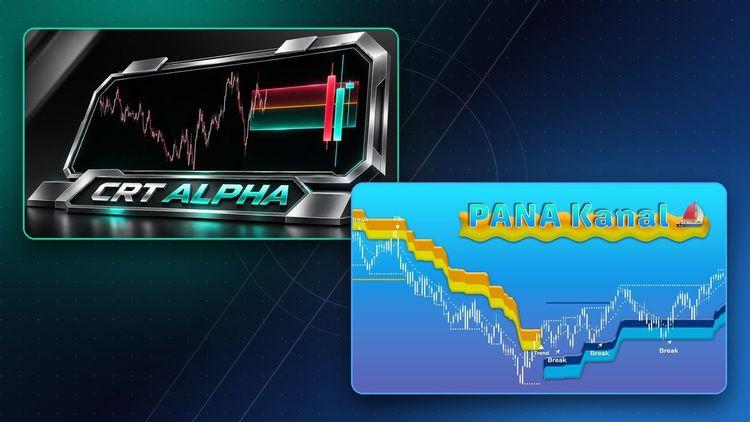
Part of a broad trading intelligence ecosystem comprising 300+ research projects and products.
Trusted by
60,000+ traders
worldwide
Reflected in
700+ verified
5-star reviews
Backed by
12 years of
research & innovation
A bullish sweep can appear during a downtrend. A bearish signal can show up while price is still trending higher.
The signal gives you a setup to evaluate, but it doesn’t have to change the side you’re watching.
This combo separates those two decisions. PANA Kanal provides the trend context with its ribbon, while CRT Alpha marks how price interacts with the high and low of a reference candle. Read the ribbon first, then use the CRT signals to narrow down the setups worth reviewing.
Tools | Its role in the combo |
| PANA Kanal | Establish the direction to watch and use the ribbon as a dynamic support or resistance reference. |
| CRT Alpha | Map the reference candle range and identify Sweep, FVG, Return, and Break setups. |
PANA Kanal combines a Fibonacci algorithm with Average True Range (ATR), a measure of volatility, to build a ribbon that tracks trend direction and highlights dynamic support and resistance. In the examples below, the blue ribbon provides bullish context and the pink ribbon provides bearish context. PANA Kanal also has its own Pullback and Break signals, but its main job in this workflow is to set the directional filter.
CRT Alpha applies Candle Range Theory by marking the high (CRH), low (CRL), and 50% midpoint of a higher-timeframe reference candle. A Sweep setup starts when price moves beyond a range boundary and closes back inside; CRT Alpha checks additional conditions before marking a qualifying signal. It can also flag reactions to Fair Value Gaps (FVGs), or price imbalances, as well as Return and Break setups.
Start with PANA Kanal. In the bullish examples, the blue ribbon sits below price and the chart highlights Sweep Up signals as long candidates. In the bearish examples, the pink ribbon sits above price and the chart highlights sell-side setups instead. Signals against the trend can still appear on the chart; the filter changes which ones you consider, not which ones CRT Alpha displays.
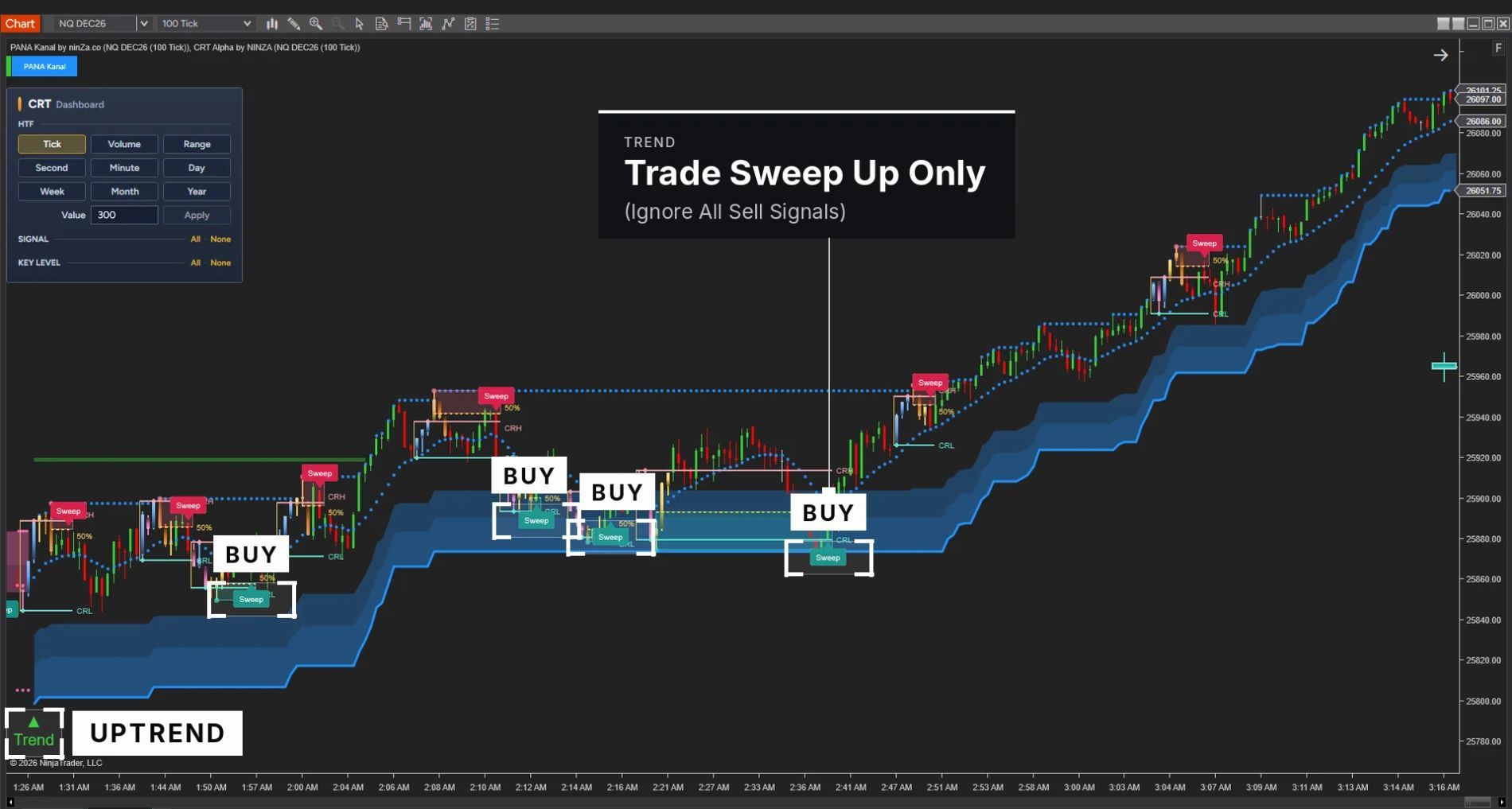
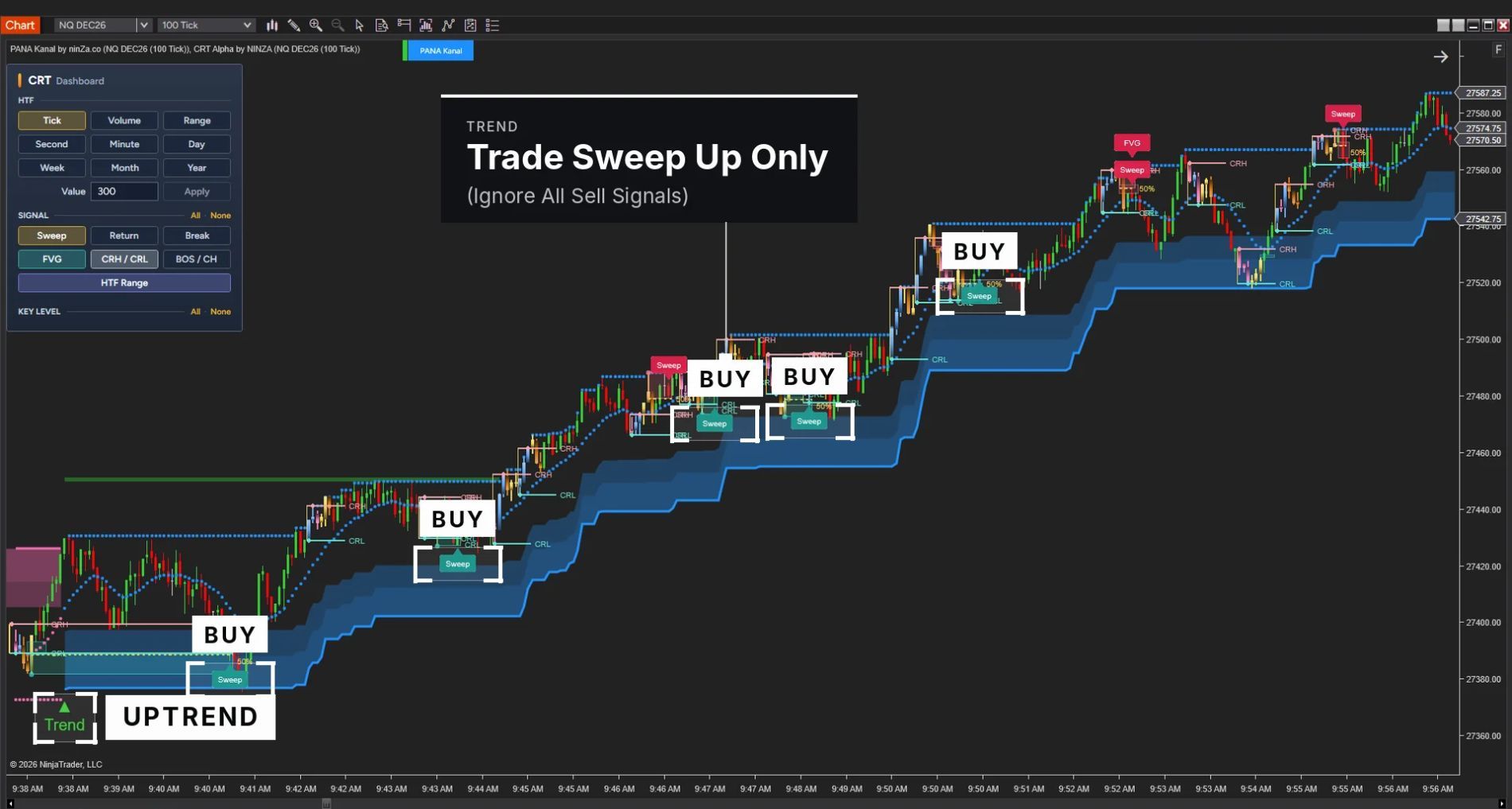
Once PANA Kanal shows an uptrend, look for CRT Alpha’s bullish sweep signals as price pulls back. The charts below highlight Sweep Up setups around the lower side of the reference range and near the blue ribbon. Bearish Sweep labels remain visible, but they don’t qualify under the long-only rule shown here.
When PANA Kanal shows a downtrend, reverse the filter. The charts below highlight bearish Sweep and FVG signals during rallies or pauses within the move lower. Bullish Sweep Up labels still appear, but they are not short-entry candidates. This is where the two tools do different jobs: CRT Alpha identifies the setup type, while PANA Kanal determines whether its direction fits the trend.
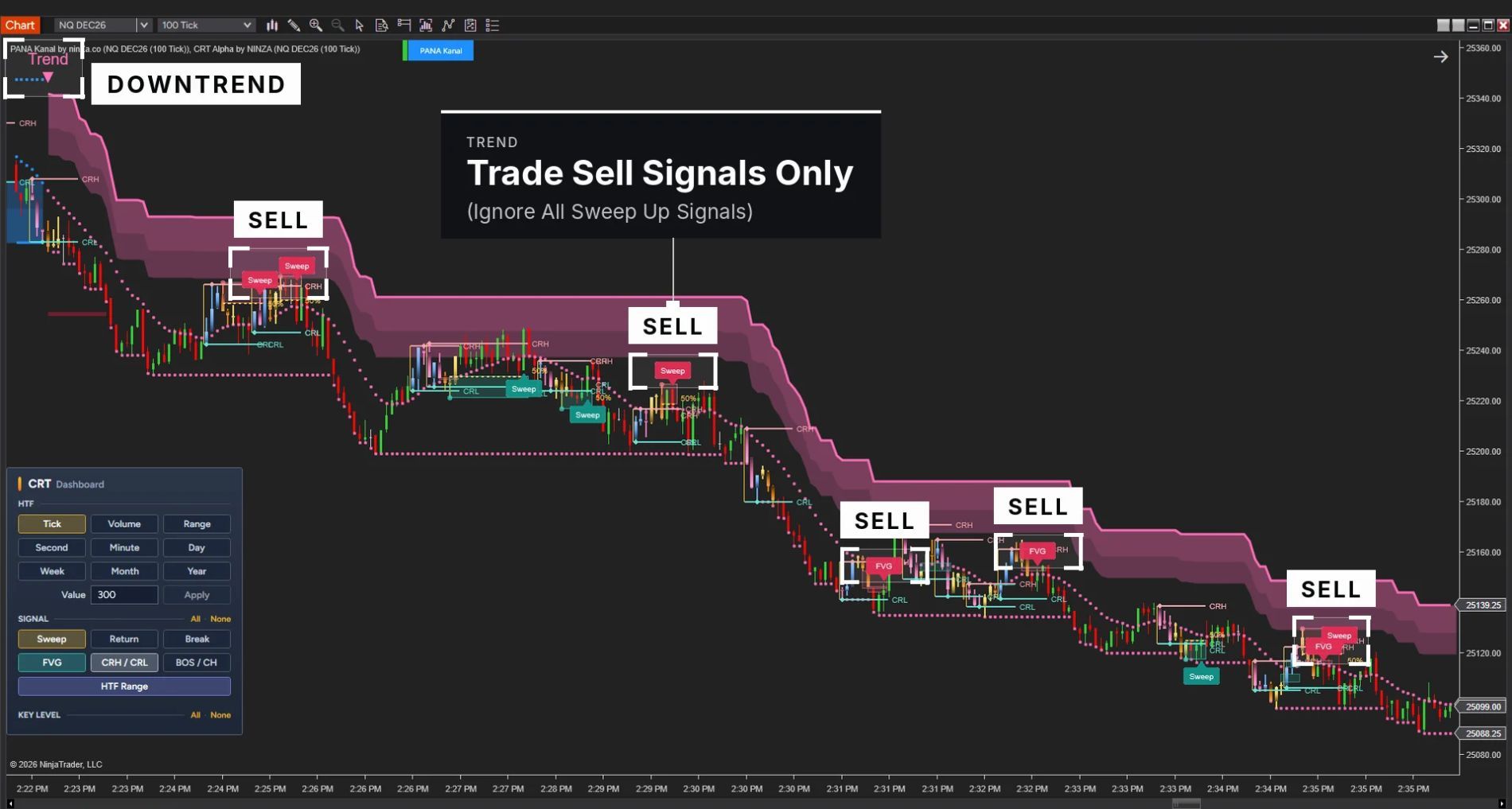
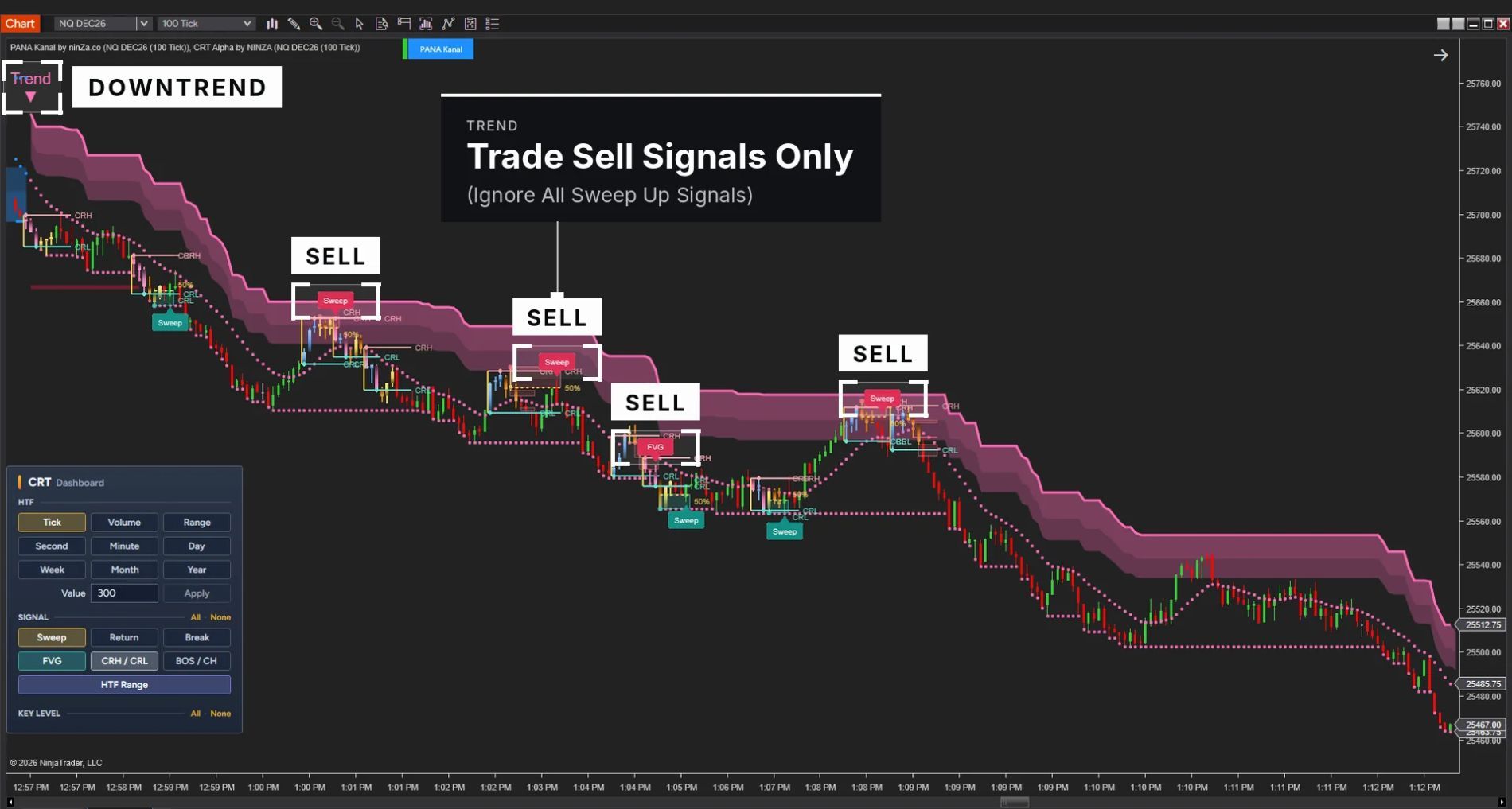
This combo is for NinjaTrader 8 traders who already watch liquidity sweeps or FVG reactions and want a clear rule for which side to focus on. Use PANA Kanal to choose the direction, then use CRT Alpha to identify the price event worth evaluating.
Watch the indicator in action. Step-by-step guides, live trading, and feature overviews.
Every purchase includes a perpetual software license, granting you the right to use the software indefinitely on the number of computers permitted by your license.
Every purchase includes guided installation assistance.
Purchases with Premium Services also include white-glove software setup and onboarding, along with personalized trading setup and workflow optimization.
Software updates & upgrades are provided at no additional cost.
For products with a modular structure, this coverage applies to the core product, while optional expansion modules may be offered separately.
Read the full policy
Every purchase includes lifetime support via email & chat, delivered by our renowned Customer Care team – widely recognized throughout the trading community for its world-class service.
As your NINZA product collection expands, Premium Path unlocks a growing range of enhanced Customer Care benefits & privileges, available through dedicated channels.
Explore Premium Path
Every purchase includes up to 3 complimentary remote assistance sessions, available within 30 days of purchase – with each session lasting up to 30 minutes.
Purchases with Premium Services include up to 6 sessions within 60 days of purchase, with priority scheduling and longer session durations.
Customers may request up to 3 product exchanges within 30 days of purchase, at little or no additional cost when exchanging for a comparable product.
Read the full policy
Due to the ease with which software products can be stored and copied, no returns will be accepted and no refunds will be issued.
ALL SALES ARE FINAL & NON-REFUNDABLE.
From individual traders to pros and institutional trading teams...
Trusted worldwide! Read traders' thoughts
Based on 800+ authentic reviews
Andrew Thomas
Al Sisemore
Christopher Heathman
Samuel Grossman
Abhijit Banerjee
Ben
Steffie
Lance S.
Jim
Use data, statistics, and quantitative models to measure market behavior and identify meaningful patterns. Turn these insights into data-driven signals, probabilities, and trading decisions.

Analyze buying and selling pressure to identify where supply or demand dominates. Anticipate potential price reactions and uncover higher-probability trading opportunities around these areas.

_1787026707358.svg)
NINZA is an official member of NinjaTrader Ecosystem together with 600+ industry-leading professionals that provide traders with quality trading products & services.




even more payment methods
Quick Links
Instructions
Support
Resources & Information
© Copyright 2026 All Rights Reserved



Because software products may be copied and stored easily, we will NOT issue refunds of any kind. ALL SALES ARE FINAL & NON-REFUNDABLE!
Futures, foreign currency, and options trading contains substantial risk and is not for every investor. An investor could potentially lose all or more than the initial investment. Risk capital is money that can be lost without jeopardizing one's financial security or lifestyle. Only risk capital should be used for trading and only those with sufficient risk capital should consider trading. Past performance is not necessarily indicative of future results.
Hypothetical performance results have many inherent limitations, some of which are described below. No representation is being made that any account will or is likely to achieve profits or losses similar to those shown; in fact, there are frequently sharp differences between hypothetical performance results and the actual results subsequently achieved by any particular trading program. One of the limitations of hypothetical performance results is that they are generally prepared with the benefit of hindsight. In addition, hypothetical trading does not involve financial risk, and no hypothetical trading record can completely account for the impact of financial risk of actual trading. For example, the ability to withstand losses or to adhere to a particular trading program in spite of trading losses are material points which can also adversely affect actual trading results. There are numerous other factors related to the markets in general or to the implementation of any specific trading program which cannot be fully accounted for in the preparation of hypothetical performance results and all which can adversely affect trading results.
NinjaTrader® is a registered trademark of NinjaTrader Group, LLC. No NinjaTrader company has any affiliation with the owner, developer, or provider of the products or services described herein, or any interest, ownership or otherwise, in any such product or service, or endorses, recommends or approves any such product or service.