M.
Â
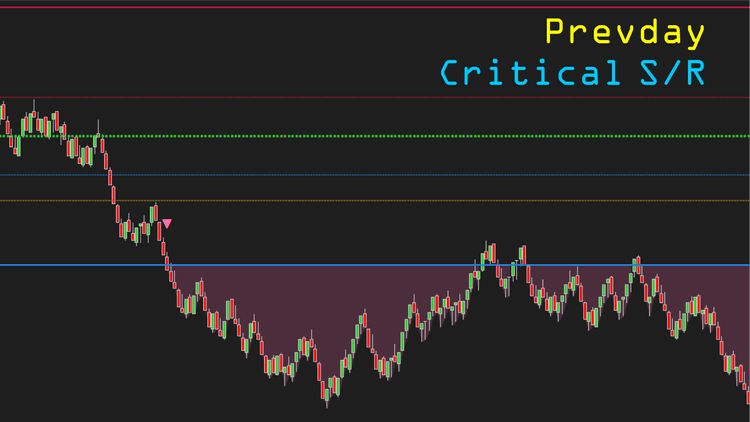
The previous day (prevday) is a solid reference for today's trading. The market often rests, retraces, or reverses around prevday's high, low, close, center - which therefore becomes critical support/resistance levels for today's session.
An upper mid & a lower mid based on prevday's range are also added because of their high values as support/resistance. You will be astonished when seeing them in action.
How many times have you bought near prevday's high or sold near prevday's low, and then got stuck in bull/bear traps? The market frequently bounces or reverses around prevday's high and low (at least temporarily) but you are tempted to make innocent trades there - just because you don't recognize these critical levels. Our prime indicator plots prevday's critical support/resistance levels onto today's session, helping you never forget these important zones.
The market breaking above prevday's high or below prevday's low is an important event, on which the indicator will trigger alerts to notify you. The price regions above the high and below the low are optionally shaded for you to easily monitor.
There are as many as 6 plots. If you don't need one, please set its color to "transparent" to hide it from chart.
Key features:
- Plot prevday's high, low, close, center
- Plot an upper mid & a lower mid based on prevday's range (fully configurable)
- Paint price regions above prevday's high and below prevday's low in 2 different colors
- Trigger alerts on prevday's range breach
- Print markers on prevday's range breach
- Be NinjaScript ready for advanced usage, only restricted by your imagination
- Expose dedicated NinjaScript signals
Descriptions are written in-house, so the index of our NT8 indicators matches what the tools actually do. Browse it whenever you get a chance.

Dedicated NinjaScript Signals
- Signal_State:
- 2 = above high
- 1 = from center to high
- -1 = from center to low
- -2 = below low
Software Changelog
- 10 Sep 2020:- Massive changes, fixes and improvements were made (DPI, display name, Z order, alert properties, marker string, bar painting, chart info, property naming/positioning/grouping); alert popup was visually enhanced
- 07 Jan 2020:- A minor issue with high/low breach was fixed.
- 25 May 2019:- The indicator was released (built new).
Policies
Software license
Every purchase includes a perpetual software license, granting you the right to use the software indefinitely on the number of computers permitted by your license.
Installation & Onboarding
Every purchase includes guided installation assistance.
Purchases with Premium Services also include white-glove software setup and onboarding, along with personalized trading setup and workflow optimization.
Software updates & upgrades
Software updates & upgrades are provided at no additional cost.Â
For products with a modular structure, this coverage applies to the core product, while optional expansion modules may be offered separately.
Read the full policy
Customer service
Every purchase includes lifetime support via email & chat, delivered by our renowned Customer Care team â widely recognized throughout the trading community for its world-class service.
As your NINZA product collection expands, Premium Path unlocks a growing range of enhanced Customer Care benefits & privileges, available through dedicated channels.
Explore Premium Path
Remote assistance
Every purchase includes up to 3 complimentary remote assistance sessions, available within 30 days of purchase â with each session lasting up to 30 minutes.
Purchases with Premium Services include up to 6 sessions within 60 days of purchase, with priority scheduling and longer session durations.
Product exchange
Customers may request up to 3 product exchanges within 30 days of purchase, at little or no additional cost when exchanging for a comparable product.
Read the full policy
Returns & refunds
Due to the ease with which software products can be stored and copied, no returns will be accepted and no refunds will be issued.
ALL SALES ARE FINAL & NON-REFUNDABLE.