
Adapting Greenz to today's reality
A long-term commitment for Captain Optimus Strong v2 owners
_1785574665845.png)
Zaccess extended through August
Receive up to $1,000 in purchase assistance
![[NEW execution tool] RapidShape Ordering](https://forestcms.nyc3.digitaloceanspaces.com/media/small_RapidShape Ordering banner (1280x720)_1785138140452.jpg)
[NEW execution tool] RapidShape Ordering
Place pending orders with a single drawing
![[Webinar replay] Auction Axis](https://forestcms.nyc3.digitaloceanspaces.com/media/small_webinar-repay-auction-axisihdhđ_1785126444244.png)
[Webinar replay] Auction Axis
James Buchman explains how he sets his bias before entering trades.
![[NEW trading strategy] BigTrade Sweep + LIQ Sweep Hunter](https://forestcms.nyc3.digitaloceanspaces.com/media/small_Thumbnail LIQ Sweep Hunter + Big Trade Sweep_1784773279263.jpg)
[NEW trading strategy] BigTrade Sweep + LIQ Sweep Hunter
What causes a Big Reversal? Liquidity isn’t enough
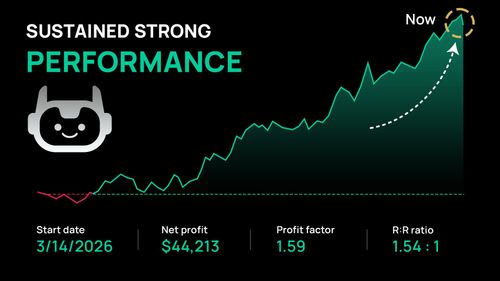
Passed Bulenox with a 3-month backtest
See how this 100% automated trading system performed on both MNQ and NQ.
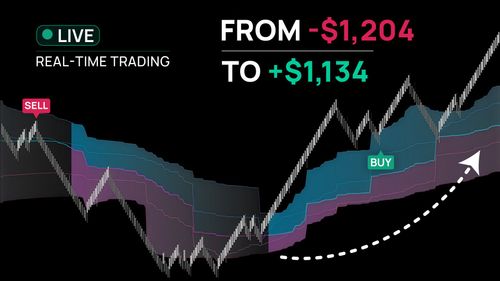
Recovering from a $1,100 drawdown
Watch how 25+ live trades using VWAP helped rebuild the account step by step.
ninZa.co Remote Support Policy
At ninZa.co, we’re always here to help when things get tricky. Whether you reach out via email, live chat, or need hands-on Remote Desktop Assistance, our goal is to make technical support simple, fair, and efficient.
This policy explains how our remote support sessions work and what you can expect during the process. Your cooperation helps us deliver the smoothest experience possible for everyone.
1. Remote support covered by Greenz
Greenz applies to products purchased on/after November 1st, 2025.
For each product with active Greenz Time, you are eligible for FREE remote support under the following terms:
- 1st month: a maximum of 04 free remote sessions
- Subsequent months: a maximum of 02 free remote sessions per calendar month
The “1st month” is defined as follows:
- Purchases made before the 20th: 1st month runs from the purchase date to the end of that calendar month.
- Purchases made on/after the 20th: 1st month extends to the end of the following calendar month.
For examples:
- Example 1: You bought ThunderZilla on August 19th → 1st month is August 19th to 31st.
- Example 2: You bought ATR-TradeShield on August 25th → 1st month is August 25th through September 30th.
To ensure fair access to remote support as our 60K+ trader community continues to grow, each free session is limited to 30 minutes.
If your session requires additional time, you may choose one of the following options:
- Option 1: Return the next day for another free 30-minute session.
- Option 2: Continue immediately with a paid session at $60 per hour.
2. Remote support NOT covered by Greenz
Remote support for products with inactive Greenz Time is provided as a paid service at $60 per hour.
Inactive Greenz Time refers to products purchased on or after November 1st, 2025, whose Greenz Time has expired and has not been renewed.
3. Remote support for products purchased before Greenz
Products purchased before the Greenz policy took effect (before November 1st, 2025) continue to include FREE remote support under the same conditions outlined above, provided the request is made within 6 months from the purchase date.
After this 6-month period, any remote support session will be provided as a paid service at $60 per hour.
4. Remote support pricing structure
Some remote support sessions are offered as a paid service to help us continue delivering personalized, high-quality assistance, while ensuring fair allocation of our team’s time and technical resources across our expanding community.
Paid remote support is provided at a rate of $60 per hour, with a minimum session value of $30 which must be paid in advance.
Session fees are calculated in 30-minute increments, for example:
- 1–30 minutes: $30
- 31–60 minutes: $60
- 61–90 minutes: $90
Payment is made in cash and confirmed by our team before the session begins.
5. Preparing for your remote session
To help us support you efficiently within the allotted time, please prepare the following before your session:
- Download and install the Zoho Assist Customer App for Windows using the links provided (this is required to join the session):
File .exe
File .msi - Ensure a strong and stable internet connection to prevent lags or disruptions.
- Close any unrelated applications to allow your computer to run more smoothly.
- Log in with your SIM account.
- Open only one new blank chart that includes the indicators related to the issue.
Please close all unrelated charts in NinjaTrader 8.
Thank you for taking a few moments to review this policy. It helps us serve you more efficiently and ensures a better experience for everyone.
This policy takes effect on December 25, 2025.
Download ~ 40 FREE indicators & reach more useful resources !!!
Your feedback will help us shape a better upgrade policy for today’s reality.
Help us improve ↓

ninZa.co Indicators
0 online
Recovering an account from a $1,100 drawdown in 25+ trades
Live trading using VWAP ⏩
44 Scalps in 2 hours | Does the edge hold up trade by trade?
Watch live trading ⏩

ninZa.co is an official member of NinjaTrader Ecosystem together with 600+ industry-leading professionals that provide traders with quality trading products & services.




even more payment methods
Quick Links
Instructions
Support
Resources & Information
© Copyright 2026 All Rights Reserved



Because software products may be copied and stored easily, we will NOT issue refunds of any kind. ALL SALES ARE FINAL & NON-REFUNDABLE!
Futures, foreign currency, and options trading contains substantial risk and is not for every investor. An investor could potentially lose all or more than the initial investment. Risk capital is money that can be lost without jeopardizing one's financial security or lifestyle. Only risk capital should be used for trading and only those with sufficient risk capital should consider trading. Past performance is not necessarily indicative of future results.
Hypothetical performance results have many inherent limitations, some of which are described below. No representation is being made that any account will or is likely to achieve profits or losses similar to those shown; in fact, there are frequently sharp differences between hypothetical performance results and the actual results subsequently achieved by any particular trading program. One of the limitations of hypothetical performance results is that they are generally prepared with the benefit of hindsight. In addition, hypothetical trading does not involve financial risk, and no hypothetical trading record can completely account for the impact of financial risk of actual trading. For example, the ability to withstand losses or to adhere to a particular trading program in spite of trading losses are material points which can also adversely affect actual trading results. There are numerous other factors related to the markets in general or to the implementation of any specific trading program which cannot be fully accounted for in the preparation of hypothetical performance results and all which can adversely affect trading results.
NinjaTrader® is a registered trademark of NinjaTrader Group, LLC. No NinjaTrader company has any affiliation with the owner, developer, or provider of the products or services described herein, or any interest, ownership or otherwise, in any such product or service, or endorses, recommends or approves any such product or service.